
Google Anthos is one of the common architectures for customers running hybrid infrastructure. It lets you deploy Kubernetes clusters across different environments using Google Kubernetes Engine (GKE) settings, and it also lets you register other Kubernetes distributions from different providers or public clouds under Google Anthos. In this post, we will review the Anthos architecture and where to install Kasten K10 to protect your applications.
Google Anthos Documentation#

As always, we will review the official documentation for the platforms and solutions covered in this post: Google Anthos, Google Kubernetes Engine, and, of course, Kasten K10 to protect your applications.
- Google Anthos: https://cloud.google.com/anthos/docs/concepts/overview
- Kasten K10: https://docs.kasten.io/latest/index.html
Reading through the documentation, we can see that Google Anthos lets us manage multiple Kubernetes clusters, whether EKS, AKS, bare metal, VMware, and others. It also provides additional capabilities such as security validation, configuration policy enforcement across multiple clusters, service mesh, and more.
For this post, we will look at where to install Kasten K10 and how to manage the protection of multiple applications across Kubernetes clusters managed by Google Anthos.
Google Cloud Anthos Backup#
Before installing Kasten K10 to protect our applications across the different Kubernetes distributions managed by Google Anthos, we need to pay attention to the documentation on node protection offered by Google Anthos, particularly the following links:
- https://cloud.google.com/anthos/clusters/docs/on-prem/latest/how-to/back-up-admin-cluster
- https://cloud.google.com/anthos/clusters/docs/on-prem/latest/how-to/back-up-user-cluster
As the official documentation states, there is no protection for the applications, persistent volumes, and similar resources running on the Kubernetes clusters managed by Google Anthos. Therefore, the only thing you can protect from Anthos is the ETCD configuration through snapshots of admin clusters and user clusters. Even the new features currently in BETA, mentioned in the documentation for backing up admin clusters via gkectl, come with additional constraints; for example, you cannot generate more than 6 ETCD backups.
Given these limitations and the fact that they do not cover the applications running on the various Kubernetes clusters managed by Anthos, Kasten K10 becomes necessary to protect applications running across different Kubernetes distributions, enabling protection, recovery, migration, and disaster recovery of applications on Kubernetes.
Kasten K10 Architecture with Google Anthos#

In fact, one of the great strengths of Kasten K10 is that it can protect applications on any supported Kubernetes cluster, covering backup, recovery, migration, and disaster recovery of applications across different Kubernetes distributions. This provides centralized management of data protection and brings that data management into the Google Anthos architecture.
As you can see in the image above, the architecture with Kasten K10 is very simple: you just install K10 on each of the Kubernetes clusters managed by Google Anthos, and then designate or use a management cluster for centralized administration through the Kasten K10 Multi-Cluster Manager.
Resources used by Google Anthos on VMware#
For this post, we set up Google Anthos and deployed clusters on VMware to validate the configurations and Kubernetes versions. In this case, we deployed:
- 1 VM: Admin Workstation (gcloud CLI and resource management)
- 3 VMs: 1 Control Plane and 2 Worker Nodes for the Administration Cluster
- 6 VMs: 3 Control Planes and 3 Worker Nodes for the User Cluster (k10anthos)

Remember that when you deploy a Kubernetes cluster from Google Anthos, the configuration applied on VMware, for example, follows best practices, meaning it will use the vSphere CSI driver. Of course, you can always configure the cluster to use whichever drivers you need.

Resources from the Google Cloud Console#

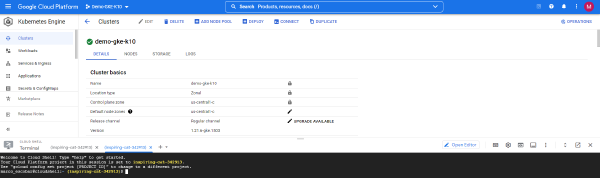
This Anthos configuration can be done from the command line as well as from the Google Cloud graphical console. As shown in the previous image, Google Cloud authenticates against the Kubernetes clusters deployed on the VMware cluster to monitor them and apply security configurations, administration policies, service mesh, or whatever else the administrator wants to enable for their applications to run correctly.

In fact, you can review all the resources in use and make changes directly from the Google Cloud console, whether reviewing the workloads or editing the amount of CPU or RAM used by the nodes managed by Google Anthos.
Kubernetes Clusters#
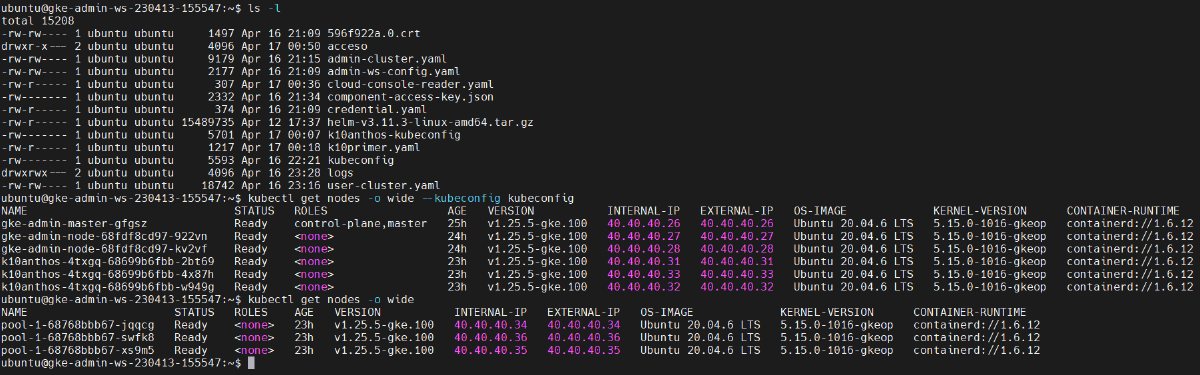
If we review the clusters created using kubectl, we can see the two clusters, Admin and User, along with their respective nodes.

How do you install Kasten K10 on these clusters? It is very simple: you install it just like on any other Kubernetes cluster. In fact, these clusters are based on GKE. For the installation, you can check the following posts on this blog:
Kasten K10 Multi-Cluster Dashboard#
Of course, since Google Anthos manages multiple Kubernetes distributions centrally, application protection needs to be managed centrally as well. That is why you need to enable the K10 Multi-Cluster Manager to manage resources, policies, and disaster recovery flows across different Kubernetes distributions.


To wrap up, using Kasten K10 is always necessary across every Kubernetes deployment, regardless of the distribution, since in many cases there are limitations when it comes to protecting business applications, including disaster recovery.