There are incidents you read about in a threat report and there are incidents that happen to you live. This is one of the second kind. It is a real case where I helped recover a huge environment after a ransomware that did not settle for encrypting virtual machines: it encrypted the datastores of the entire hypervisor, and took the backups down with them. What follows is the story of that recovery, and the lessons it left behind, which are worth more than any architecture diagram.
A note on confidentiality: The case is real. Any data that could identify the customer, their location, their industry or the ransomware group was omitted or generalized on purpose. The figures are rounded. What I share is the how and the why, not the who.
The call#
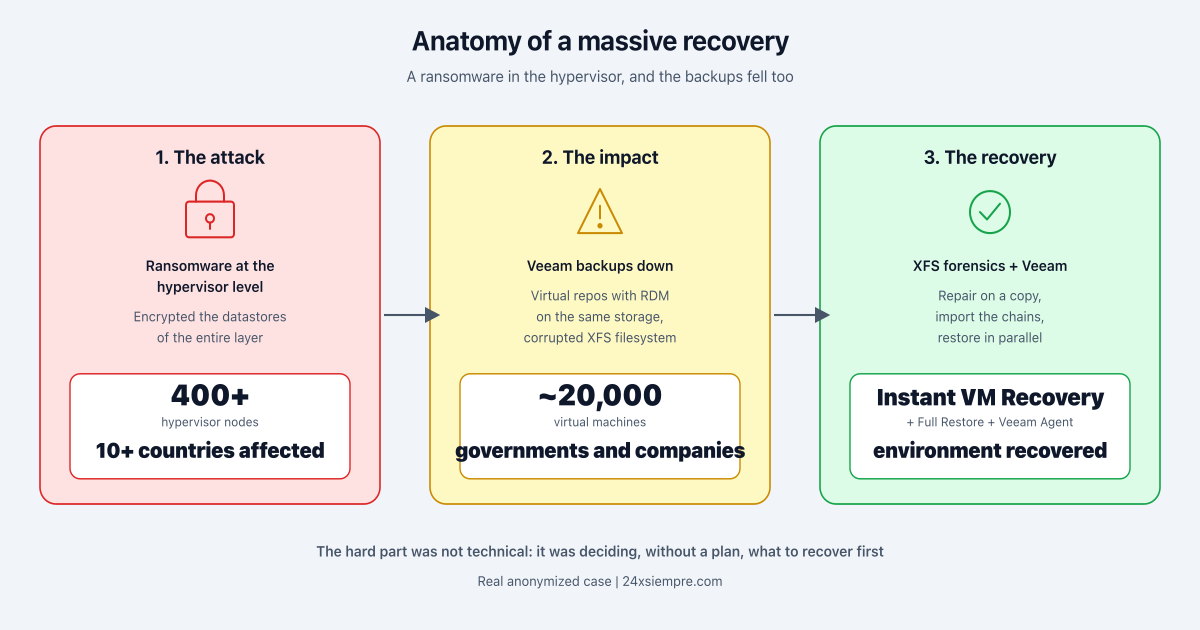
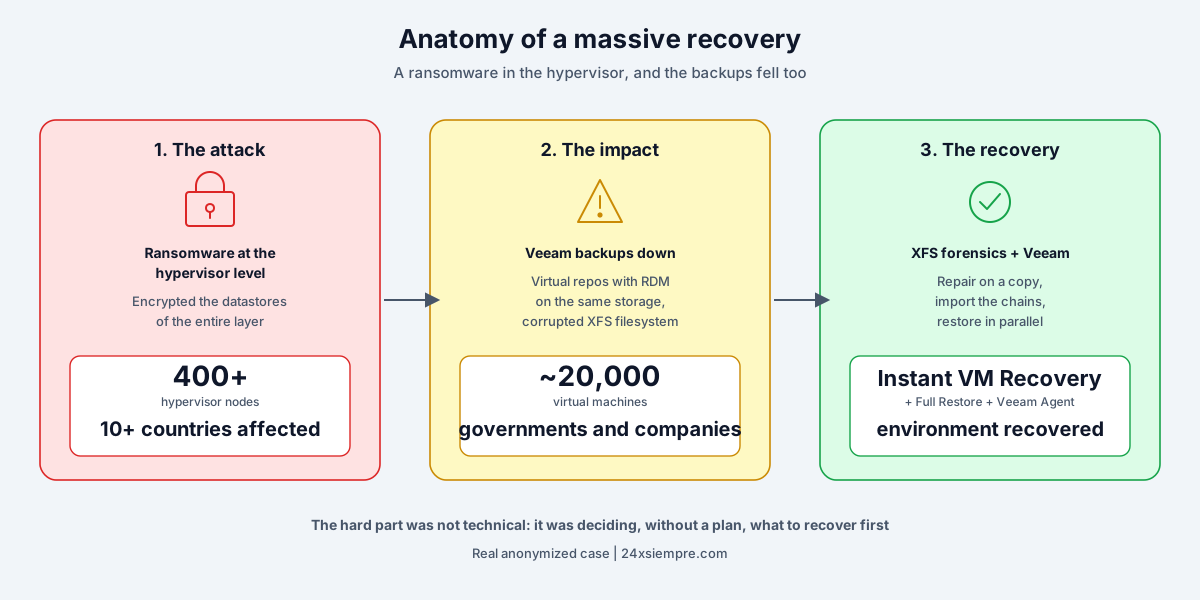
I was contacted to help with a recovery that sounded impossible. On the other side was a provider that managed the infrastructure of multiple customers across more than a dozen countries. The initial description was the kind that makes you sit up straight: a ransomware had encrypted the datastores of more than 400 hypervisor nodes. Not one machine. Not one cluster. The entire virtualization layer. And with it, around 20,000 virtual machines belonging to governments and companies spread across several countries.
The sentence that finished sizing up the problem came right after: the Veeam repositories were down too.
That is where this case stops being a common ransomware incident and becomes something much more serious. When the attack also takes out your last line of defense, the backup, you are no longer recovering, you are doing archaeology.
Straight into the War Room#
When we landed, we went straight to the customer. We did not even stop at the hotel. We walked into a room where the team had been in crisis mode for a while, and what we found was not people looking for the best tool, but people looking for any tool. Some were already evaluating manual data recovery options like TestDisk, an open source utility that works, but that in a petabyte scale environment can take an eternity. When the only option on the table is one that would take weeks, you already know the plan never existed.
With my colleague we asked the usual questions: did you try this, that, the other thing? Did you exhaust every option before reaching for this? The answer was yes, they had already tried everything they knew. The mood in the room was that of an exhausted team. Some had already given up, assuming the data was lost forever. But in these cases there is always an ember of hope that something can be rescued, and that hope was exactly what we had been called in to sustain.
The design that turned against them#
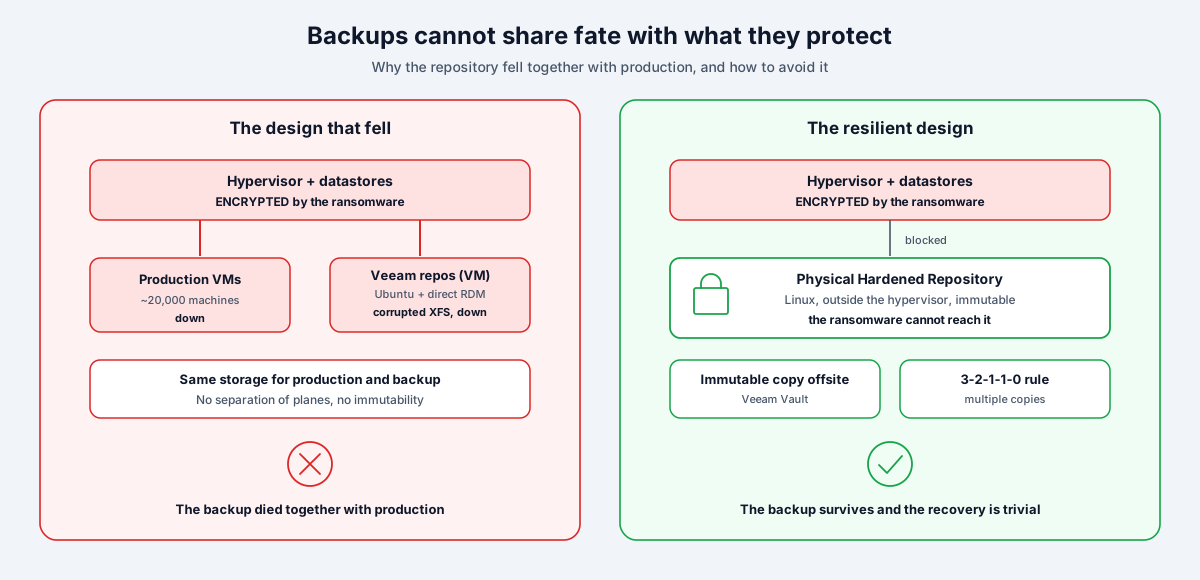
To understand why the backups fell together with everything else, you have to look at the architecture. The Veeam repositories in this environment were virtual machines running Ubuntu 18.04, and the backup storage was attached to those VMs through RDM (Raw Device Mapping) directly from the storage array.
It sounds reasonable on paper. In practice, it meant the repositories lived on the same infrastructure they were protecting. When the ransomware encrypted the datastores, there was no real separation between the production data and the backup. The backup was not on another plane, it was on the same boat.
This is the first lesson, and I put it up front because it is the one that hurts the most: a backup repository that depends on the same infrastructure it protects is not a backup, it is a copy that shares the same fate.
And here it is worth being direct: none of this was a Veeam failure. The backups existed, they were complete and, as we will see, they were recovered in full. What failed was the architecture around them and the absence of basic controls. Deploying repositories as virtual machines with RDM on the same storage you are protecting is not the recommended architecture, it is exactly what best practices tell you to avoid. Veeam offers precisely the controls that would have neutralized this attack, a physical Hardened Repository, immutability, Object Storage with Object Lock and today of course Veeam Data Cloud Vault, but none of them were implemented. The tool was ready to do its job; the design did not let it.
The technical knot: when the filesystem breaks on its own#
Here comes the part that turned this into forensics work rather than operations.
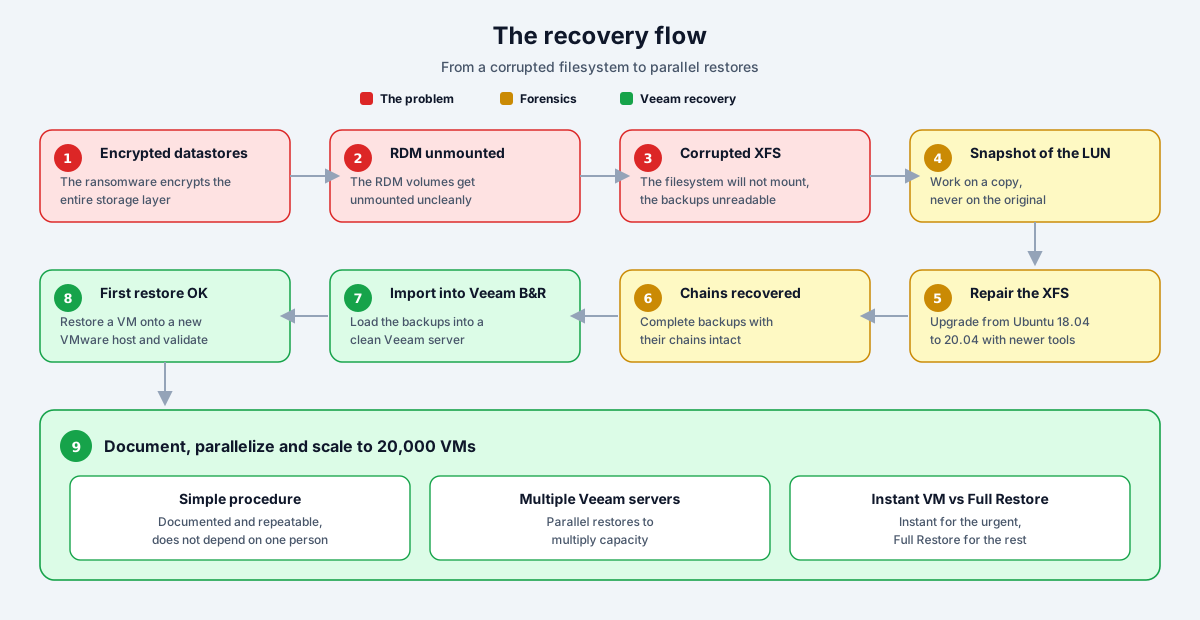
When the datastores were encrypted, the RDM volumes feeding the repositories were unmounted unexpectedly. A dirty unmount of an active volume is the perfect recipe to corrupt a filesystem, and that is exactly what happened: the volumes ended up with a corrupted XFS filesystem.
When we tried to remount them, they showed nothing. The system only reported that the filesystem was corrupted. The backups were there, physically, but the operating system could not read them.
The first attempt was to repair the XFS from the same Ubuntu version they were running, 18.04. It did not work. That version carried a known behavior in the XFS tools that prevented reading or repairing the filesystem correctly in this scenario. We were trying to open a safe with the one key that did not fit.
The recovery: work on a copy, never on the original#
On the second day we arrived at the office very early to build the action plan: really understand how the Veeam repositories had been affected, what architecture they had, how the attack had happened, and confirm that physical servers and a new, working vSphere environment were already available to restore into. The pressure was enormous, the kind where everyone is looking at you waiting for an answer. So I asked my colleague for one concrete favor: that he handle the customer and leave me alone, so I could focus on one thing only, recovering the repositories. In a crisis, isolating the person untangling the technical knot from the noise of the room is worth more than it seems.
The way out was to change tools. I asked them to upgrade to a more recent version of Ubuntu, 20.04, which shipped newer XFS utilities capable of handling the repair we needed. It sounds simple, but internet access in that environment was strictly restricted and the ISO downloaded painfully slowly. Waiting for that download, knowing everything depended on it, was one of the longest stretches of hours.
But before touching anything, the golden rule of any forensic recovery: you never work on the original data. I asked them to take a snapshot of the LUN so we could work on a copy of the RDM volume. If the repair went wrong, I did not want to destroy the only evidence we had left.
Here a problem appeared that was not in any manual: in several cases there was no space left to take the snapshot of the RDM volumes. The storage administrator had to start reclaiming space on the fly to generate enough room to work on the copy without risking the original. Small detail, huge impact: without that space, there was no safe recovery possible.
With the copy mounted and the right tools, I ran the XFS repair process. And it worked. When the filesystem mounted again and the .vbk and .vib files appeared, the Veeam fulls and incrementals, it was one of those moments of pure joy that justify every hour before it. It was no longer archaeology, we could see them. I recovered the data and, with it, all the existing backups and their complete chains. The intact chains were key: without the chain, an incremental backup is worthless.
With the backups in hand, the rest was familiar Veeam territory: import the recovered backups into a Veeam Backup & Replication server, and restore the first machine onto a new VMware host that had been provisioned clean. When that first VM came up and served traffic, we knew two things: the process worked, and it could be replicated. By then we had been going for more than 12 hours straight, so we documented what we had and went to the hotel to get some sleep, because the next day, Sunday, we had to turn that first success into a process.
From one recovery to twenty thousand#
Recovering one machine is very easy with Veeam. Recovering twenty thousand, across multiple volumes holding several petabytes of data, is an industrial process, and that is where the work changed in nature. The first thing was to document the procedure end to end, step by step, so it would not depend on me or on anyone in particular. A simple, repeatable procedure is worth more than an expert who does not scale.
With the procedure ready, the strategy was to parallelize everything. Multiple Veeam Backup & Replication servers were deployed to run many restores simultaneously, and depending on the size and urgency of each workload, the technique was chosen:
- Instant VM Recovery to bring critical machines up fast, booting them directly from the backup while the migration ran in the background.
- Full VM Restore for the ones that needed to return to production complete, with no compromise on execution or time.
Despite the magnitude, the recovery moved fast, precisely because the procedure was simple and the parallelization multiplied capacity.
If it powered off, it was gone: backing up what was still running#
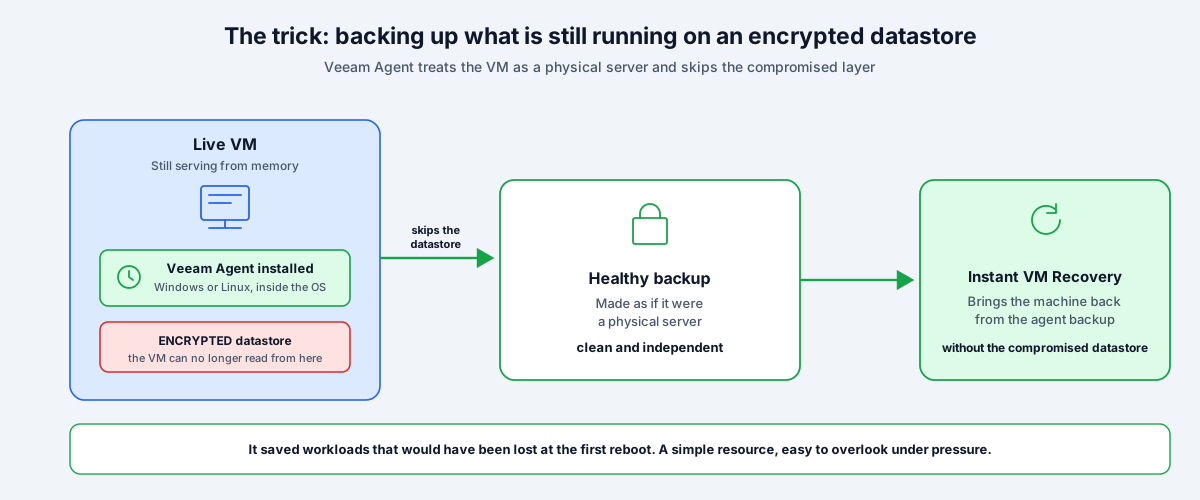
There was a scenario that was not anticipated given the type of encryption. Some machines had remained running and serving, but their datastore was encrypted. That is: the VM was still alive in memory, answering requests, but the storage underneath it was useless. If it powered off, it was not coming back. And we had no clean backup of them. Traditional hypervisor level backup was not an option either: to back up a VM, the hypervisor needs to create snapshots on that same datastore, and with the datastore encrypted that path was dead.
The solution came from going around the problem instead of facing it head on: install Veeam Agent for Windows inside those machines to back them up as if they were physical servers, reading the operating system from the inside and completely bypassing the encrypted datastore layer. For the Linux machines in the same situation, the same strategy with Veeam Agent for Linux.
It worked. Once we had a healthy backup made by the agent, all it took was an Instant VM Recovery from that backup to have the machine back, no longer depending on the compromised datastore. That trick, easy to explain but easy to overlook under pressure, saved workloads that would otherwise have been lost at the first reboot.
The identity that was not backed up#
There was a problem that showed up early and complicated everything that came after: there were no up to date backups of the identity system. Not Microsoft Active Directory, not Entra ID. The authentication backbone of the entire environment, without a reliable copy to recover from.
That forced us to work with local accounts on every machine. In a 20,000 VM environment, operating with local accounts is slow, insecure and does not scale. Identity is one of the first things you need in a recovery, because without a directory you cannot log into the systems you are bringing up in an orderly way, you cannot delegate access, and you cannot keep track of who did what. A nonexistent or outdated backup of Active Directory or Entra ID turns every login into a problem, and multiplies the time of everything else.
RTO was solved, RPO was flying blind#
Instant VM Recovery solved the RTO for us: machines came back fast. But RTO is only half of the equation. The other half, the RPO, was being handled blind.
Here another gap appeared that nobody had considered: there was no process to document what was being recovered. Which restore point was used for each machine? Was it the latest backup, or did we have to go back to an earlier one? What date was it from? Because in several cases, due to the filesystem corruption, the latest point was unusable and we had to fall back to a previous backup. And falling back to a previous backup means one concrete thing: data loss.
The question nobody could answer was precisely the most important one for the owner of each service: how much data, from how much time, was lost on this machine? Without a record of which point was used and what date it was from, the users of those servers had no way of knowing what information they had lost or where to rebuild from.
And that is a huge difference. Recovering the machine is the technical part. Being able to tell the business “this system came back to its state as of this date and time, you lost this window of data, rebuild from here” is the part the customer actually cares about. Without documenting the restore point and the real RPO of each workload, that conversation is impossible, and the business is left rebuilding blind.
The weekend against the clock#
On Sunday we arrived early again, this time with the recovery strategy in hand. That day we ran several test recoveries, picking machines at random and countries at random, to validate that the process held up across different scenarios. But when we asked the customer what to recover first, which countries, which services, the answer was that it was better to wait until Monday: more people from the executive committee would arrive and only then would the right decisions be made. So we left early to rest, because we knew Monday was when the real work began.
On Monday the mass recovery started in earnest. I shared the documented process with everyone involved, we brought up the Veeam servers in parallel and, between the people in the room and the teams connected remotely working around the clock, the machine was finally spinning at full speed. And it was right there, with everything ready to recover at scale, that the one problem we could not solve with technology became impossible to ignore: nobody knew in what order to do it.
What do we recover first? The question nobody could answer#
And here we reach the part that marked me the most, because it was not a technical problem. It was a decision problem, and those are not solved with Veeam.
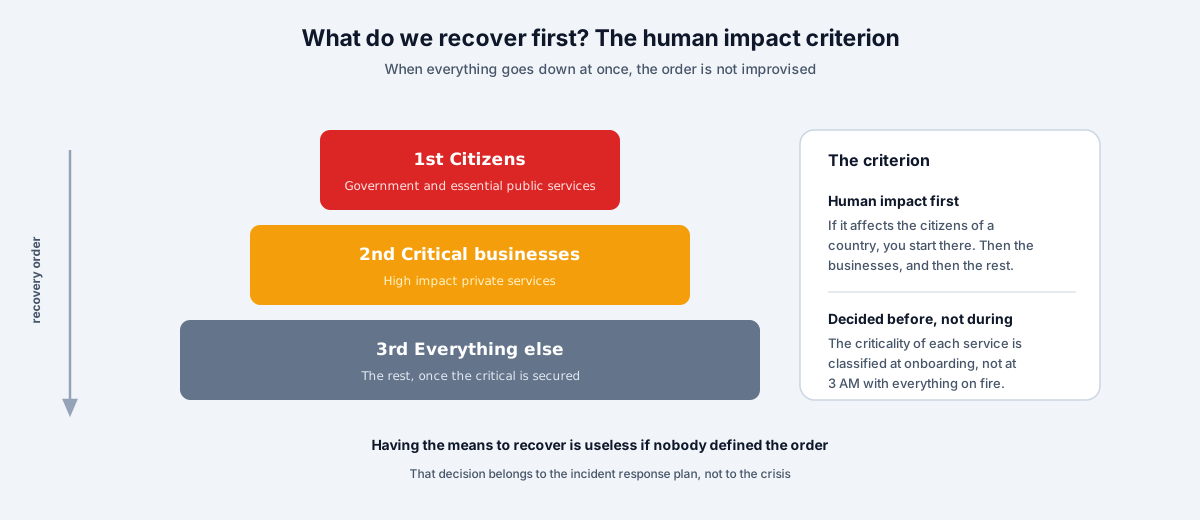
When the procedure was already working and we had the capacity to recover in parallel, the hardest question of all appeared: what do we recover first? Which country? Which customer? What affects citizens? What affects a government?
The customer had no answer. There was no incident response plan. There was no way to identify which services were most critical, no prioritization criterion by customer, by impact or by anything else. At the most expensive moment of the entire crisis, the organization was deciding the recovery order by gut feeling.
For a provider hosting third party workloads this is especially serious, because the question has an answer, but the answer is built before, not during. A provider can and must know how critical the workloads it hosts in its datacenters are, and that is defined at customer onboarding, when the services are set up. Not at 3 AM with the environment on fire.
The recommendation I ended up giving was a simple criterion, almost common sense, but one that nobody had articulated in the middle of the chaos: if it affects the citizens of a country, you start there. There were government entities whose outage hit people directly, so those went first, and then the companies. A criterion of human impact before anything else.
Recovery does not end when the VMs come back#
When the machines started coming back, there was a sense of relief that was premature. We brought the services up, yes, but nobody ran a security analysis of the recovered environment, at least on the perimeter. And that worried me for a very concrete reason.
One of the causes of the intrusion was the use of privileged accounts. The attackers did not force anything exotic, they walked in with valid credentials. So the obvious question, the one nobody was asking, was: what if they left a backdoor? What if the machine with the vulnerability they used to get in still has that vulnerability after being recovered?
Because that is the trap: if you recover the environment exactly as it was, you also recover the hole they came in through. Restoring a backup from before the incident also restores the open door. The attackers could exploit the same vulnerability again and walk right back in, this time into a freshly recovered environment with everyone exhausted.
Recovering without reviewing security is rebuilding the house with the same forced lock. That was, in fact, one of the reasons I ended up building vScan, a tool to analyze the security posture of the environment, identify vulnerabilities and entry points before declaring the recovery successful. Because “the VMs are up” is not the same as “the environment is secure”, and confusing the two is how you end up living the same incident twice.
The outcome#
We left the entire process documented end to end: the filesystem repair, the mounting, the rescan, the validation of restore points and the choice of recovery type, Instant VM Recovery or Full VM Restore, onto the new hosts. That was the idea from the start: that the recovery would not depend on me or on my colleague, but on a procedure anyone on the team could execute. We were on the ground for three or four days; the procedure stayed forever.
And it worked. The staff in charge kept applying the process, recovering the machines in the order the business had defined by country and criticality, and the environment was back in operation in a remarkably short time for the size of the attack. The same team that on day one had given up, assuming the data was lost, ended up recovering the entire environment with a procedure that fit on a single page.
But what left me most at ease came afterward. The customer implemented the best practices we left them in writing: an architecture with immutability, multiple copies, malware analysis on the backups, and IRP and DRP plans sized according to the criticality level the business defines. They did not stop at the recovery, they closed the doors that had been left open. From then on they kept adding Veeam best practices, and we still keep in touch, crossing paths on our travels. That, in the end, is the best sign that the job was done right: not the recovery itself, but the fact that they never needed another one like it.
What this case teaches#
The recovery went well. Given the size of the attack, the environment was back in operation in very little time. But a happy ending does not erase the fact that almost everything that made this crisis so hard was avoidable. These are the lessons, split into the two layers where they hurt.
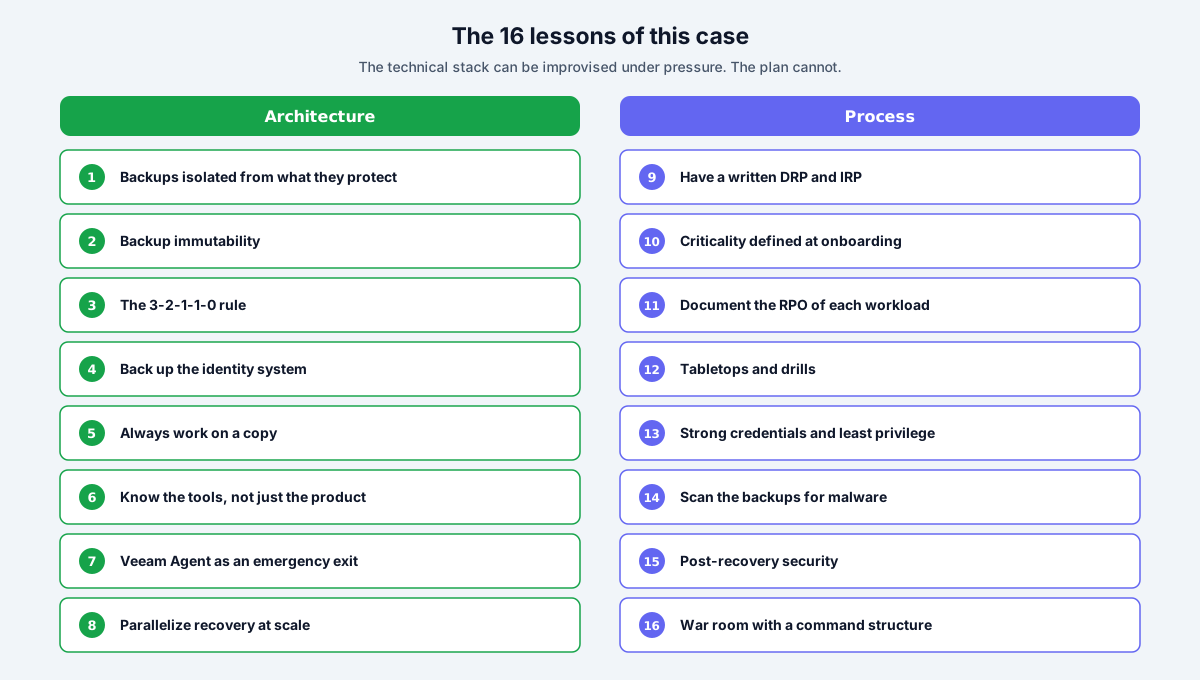
Architecture lessons#
1. Your backups cannot share fate with what they protect. Virtual repositories with RDM on the same encrypted storage meant the backup fell together with production. A physical Hardened Repository, on Linux and with native immutability, lives out of reach of a ransomware that attacks the hypervisor.
2. Without immutability, you are one step away from disaster. If those backups had been on an immutable repository or in Veeam Data Cloud Vault, no XFS forensic repair would have been needed. The recovery would have been simple, which is exactly how a recovery should be.
3. The 3-2-1-1-0 rule is not decorative. The offline or air-gapped copy was missing, and so were multiple copies of the backups. A single copy, on a single plane, is a single point of failure waiting for its turn. It is, quite literally, putting all your eggs in one basket.
4. Your identity system is the first service to recover, and it needs its own backup. Not having a recent, reliable backup of Active Directory or Entra ID forced us to work entirely with local accounts, which slowed down every login in a 20,000 VM environment. Without a directory there is no orderly recovery.
5. In forensics, you always work on a copy. The LUN snapshot to repair the XFS without touching the original is what allowed us to make mistakes without consequences. And the space for that snapshot has to exist before you need it.
6. Know the tools, not just the product. The XFS bug in Ubuntu 18.04 could have stopped the entire recovery. Knowing that upgrading to 20.04 shipped utilities capable of doing the job was the difference between recovering and giving up.
7. The Veeam Agent is an emergency exit few people have mapped. Backing up a live VM as if it were physical, bypassing the compromised datastore, is a resource worth knowing before you need it.
8. Recovery at scale is won through parallelization. Multiple Veeam Backup & Replication servers and Instant VM Recovery for the urgent workloads is what turned an impossible process into a manageable one.
Process lessons, which are the ones that cost the most#
9. Not having a DRP or an IRP is the real vulnerability. There was no disaster recovery plan, no incident response plan, not even a simple guide on what to do in the face of an attack. The technical stack can be improvised under pressure, but the decision of what to recover first cannot.
10. Service criticality is defined before, not during. For a provider managing infrastructure for multiple customers, classifying the criticality of each workload at onboarding is not bureaucracy, it is the input that lets you prioritize when everything goes down at once.
11. Documenting each recovery is not bureaucracy, it is what lets the business rebuild. Which restore point was used, what date it was from, what the real RPO of each workload was. We solved the RTO with Instant VM Recovery, but without recording the data gap of each machine, the service owners did not know how much information they lost or where to rebuild from.
12. If you never rehearsed it, you do not know how to do it. Nobody had ever run a tabletop or a drill for an incident of this scale. The first rehearsal cannot be the real event.
13. Weak credentials turn an incident into a catastrophe. The boring detail of all time, which in a crisis becomes the most expensive one. And in this case, privileged accounts were precisely the attack’s way in.
14. A backup you do not scan can reinfect you on restore. Without malware analysis on the backups, every restore is a roulette spin. Veeam Threat Hunter and Secure Restore exist precisely so you do not bring the threat back into production.
15. Recovery does not end until you have validated that the attacker cannot get back in. Recovering the environment exactly as it was means recovering the hole they came in through. Post-recovery security analysis, vulnerability scanning, perimeter review, credential rotation and threat hunting over what was recovered. That need was one of the reasons I ended up building vScan.
16. The war room needs structure. Improvisation in the crisis room costs hours, and in an incident hours are money and, sometimes, public services down. Frameworks like NIST SP 800-61r3 exist so that structure does not have to be invented on the fly.
Nothing had to be invented: the map already exists#
If this case makes anything clear, it is that the organization did not need to pioneer anything. Everything that was missing is already written in mature, public standards. Resilience is not an act of creativity under pressure, it is the disciplined application of frameworks that have existed for years.
- NIST SP 800-184 (Guide for Cybersecurity Event Recovery): it is, literally, the guide for recovering from an event like this one.
- NIST SP 800-61r3 and the SANS PICERL cycle (Preparation, Identification, Containment, Eradication, Recovery, Lessons learned): the incident response process, the IRP.
- NIST SP 800-34 (Contingency Planning Guide): the foundation of the disaster recovery plan, the DRP.
- ISO 22301 and ISO/IEC 27031: business continuity and the ICT readiness to sustain it.
- NIST Cybersecurity Framework 2.0: the umbrella framework, with its Respond and Recover functions tying all of the above together.
- The 3-2-1-1-0 rule: at least 3 copies of the data, on 2 different media, 1 offsite, 1 offline or immutable, and 0 errors after verifying recoverability. The backup best practice that, on its own, would have changed the outcome of this case.
You do not need to adopt them all at once or to the letter. But having a written IRP and DRP, a criticality classification per service and a backup architecture aligned with these guides is, exactly, the difference between an orderly crisis and one at 3 AM without knowing where to start.
The uncomfortable conclusion#
The hard part of this case was not the XFS repair, or the Veeam Agent trick, or the parallelization. All of that was technical work, intense but bounded. The hard part was discovering, in the middle of the crisis, that the organization had no answer to the most basic question of resilience: when everything goes down, in what order do we bring it back?
Resilience is not the backup tool. The tool is necessary, but it is the easy part. Resilience is having decided, long before the incident, what matters most, where your copies live, who makes the decisions and in what order things are recovered. All of that is built in peacetime. If you leave it for the day of the attack, it is already too late.
If your organization or your customers depend on you being able to recover under pressure, it is worth having this conversation before it becomes urgent. Write to me on LinkedIn or follow the 24xsiempre.com feed for more content on resilience, backup and real world recovery.
Frequently asked questions#
Can a Veeam backup be recovered if the repository ends up with a corrupted filesystem?
Yes. If the backup exists and the corruption is in the filesystem (not in the data itself), you can repair the filesystem and recover the backup files with their chains. In this case, the XFS volumes were corrupted after a dirty unmount, but once repaired, the .vbk and .vib files appeared intact, and were then imported into a Veeam Backup & Replication server to restore.
How do you repair a corrupted XFS filesystem?
Always work on a copy of the volume (a snapshot of the LUN), never on the original, and with the XFS utilities of a recent operating system version. Here the old Ubuntu version (18.04) carried a behavior that prevented the repair, and upgrading to 20.04 with newer utilities is what made it possible to mount and recover the data.
How do you back up a VM if its datastore is encrypted but the machine is still running?
Install a backup agent inside the VM (Veeam Agent for Windows or Linux) to back it up as if it were a physical server, reading the operating system from the inside and completely bypassing the compromised datastore layer. Then you run Instant VM Recovery from that agent backup, so the machine no longer depends on the encrypted datastore.
Why did the Veeam backups fall in this attack?
Not because of a Veeam failure, but because of the architecture. The repositories were virtual machines with RDM disks on the same storage they were protecting, so when the datastores were encrypted they fell together with production. The controls that would have prevented it (a physical Hardened Repository, immutability, Veeam Vault) were not implemented. The lesson: a backup that shares fate with what it protects is not a backup.
What controls prevent a ransomware at the hypervisor level?
Isolate the repository from the infrastructure it protects (a physical Hardened Repository), apply immutability to the backups, use object storage with Object Lock or Veeam Vault, follow the 3-2-1-1-0 rule with at least one offline or air-gapped copy, and scan the backups for malware before restoring. None of these controls were active in this case, and any one of them would have neutralized the attack.
How should RPO be documented during a mass recovery?
Record, for every machine, which restore point you used and what date it was from. Here the corruption forced falling back to earlier backups on several servers, which means data loss, and without that record the owners of each service could not know how much information they lost or where to rebuild from. Instant VM Recovery solves the RTO, but you only know the real RPO if you document it.
Where do you start recovering when everything goes down at once?
By human impact: first the services that affect citizens (government and essential public services), then critical businesses, and then the rest. But that order is not improvised during the crisis, you define it beforehand in the incident response plan (IRP) and in the criticality classification of each service, which for a provider is set at customer onboarding.