
Something I’ve been working on for several months and that is finally taking shape is Jadi, a vulnerability scanner specifically designed to analyze mounted backups and filesystems. The name is no coincidence JADI stands for my kid’s initials, so this project holds a special meaning for me beyond the technical side. In this post I’ll walk you through what it’s all about, why I built it, how it works under the hood, and what’s coming next.
¿Why Jadi?#
Those who know me know I’ve been working with Cloud, Kubernetes, AI, data protection, backup, and security technologies for several years now. And along the way, a question that always comes up in incident response and forensic analysis scenarios is: what vulnerable software did that system have when it was compromised?
There are excellent vulnerability scanning tools out there like Trivy and Grype, and I fully recommend them for Linux environments, containers, and images. They do a beautiful job. But when the scenario involves Windows operating systems, registry hives, installed KBs, Microsoft patch supersedence chains, the story changes quite a bit. Windows coverage in these tools is limited or nonexistent, and that’s a real problem when most enterprise environments are still running Windows on their servers and workstations.
On top of that, existing tools are designed to scan live systems - installed agents, running containers, active repositories. But when you have a backup mounted in read-only mode, a snapshot of a server that no longer exists, or a forensic disk image, most solutions simply don’t apply.
That combination of needs, offline backup scanning + real Windows coverage is what motivated me to start working on this idea months ago. That’s where Jadi comes in. The idea is simple but powerful: mount a backup, scan it, and get a complete report of known vulnerabilities without needing to install anything on the original system.
¿What does Jadi do?#
The project is available at github.com/mescobarcl/jadi and is currently at version 0.1.0 with a published release for Linux x86_64. It’s a binary written in Rust that runs on your local machine or Linux server and analyzes any mounted filesystem, preferably Microsoft Windows.
12 Ecosystem Scanners#
Jadi detects software by analyzing configuration files and manifests across multiple ecosystems: npm, PyPI, Maven, Gradle, Go, NuGet, Composer (PHP), RubyGems, Cargo (Rust), .NET, and JAR files. It also performs binary pattern matching to detect versions of OpenSSL, Apache, nginx, PHP, MySQL, PostgreSQL, Redis, and Node.js directly from binaries.
Offline Windows Analysis#
It parses registry hives (SOFTWARE, NTUSER.DAT) without needing Windows to be running. It detects installed software, KBs/hotfixes, Windows versions, and .NET Framework. It also resolves Microsoft patch supersedence chains, something very few tools do correctly.
5 Vulnerability Sources#
It correlates detected software against NVD, OSV, MSRC, GitHub Security Advisories (GHSA), and CISA KEV. The vulnerability database is automatically updated daily on the CDN, and by running jadi update-db the latest version is downloaded with SHA256 integrity verification.
Important: Since the database is updated every day with new vulnerabilities, it’s recommended to always run
jadi update-dbbefore each scan to make sure you’re working with the most up-to-date information. New CVEs are published constantly, and a single day’s difference could mean missing a critical vulnerability.
KEV and Ransomware Intelligence#
It doesn’t just tell you what vulnerabilities you have, it also tells you which ones are being actively exploited according to the CISA catalog, and which ones are associated with known ransomware campaigns. This is key for prioritization in incident response scenarios.
SBOM Generation#
It generates software inventories in SPDX 2.3 and CycloneDX 1.5 formats, which is exactly what’s needed for compliance.
7 Output Formats#
Table (with terminal colors), JSON, SARIF (for CI/CD), CSV, Markdown, SPDX, and CycloneDX. It also includes severity-based exit codes (0 = clean, 2 = critical vulnerabilities found), making it perfect for pipeline integration.
Quick Example#
# Install (Linux x86_64)
curl -LO https://github.com/mescobarcl/jadi/releases/latest/download/jadi-linux-x86_64
chmod +x jadi-linux-x86_64 && sudo mv jadi-linux-x86_64 /usr/local/bin/jadi

# Download the vulnerability database
jadi update-db

# Scan a mounted backup
jadi scan /mnt/backup

# Only critical KEV vulnerabilities associated with ransomware
jadi scan /mnt/backup --min-severity critical --kev-only --ransomware-only

# Generate SBOM in SPDX format
jadi scan /mnt/backup -o spdx -f sbom.spdx.json
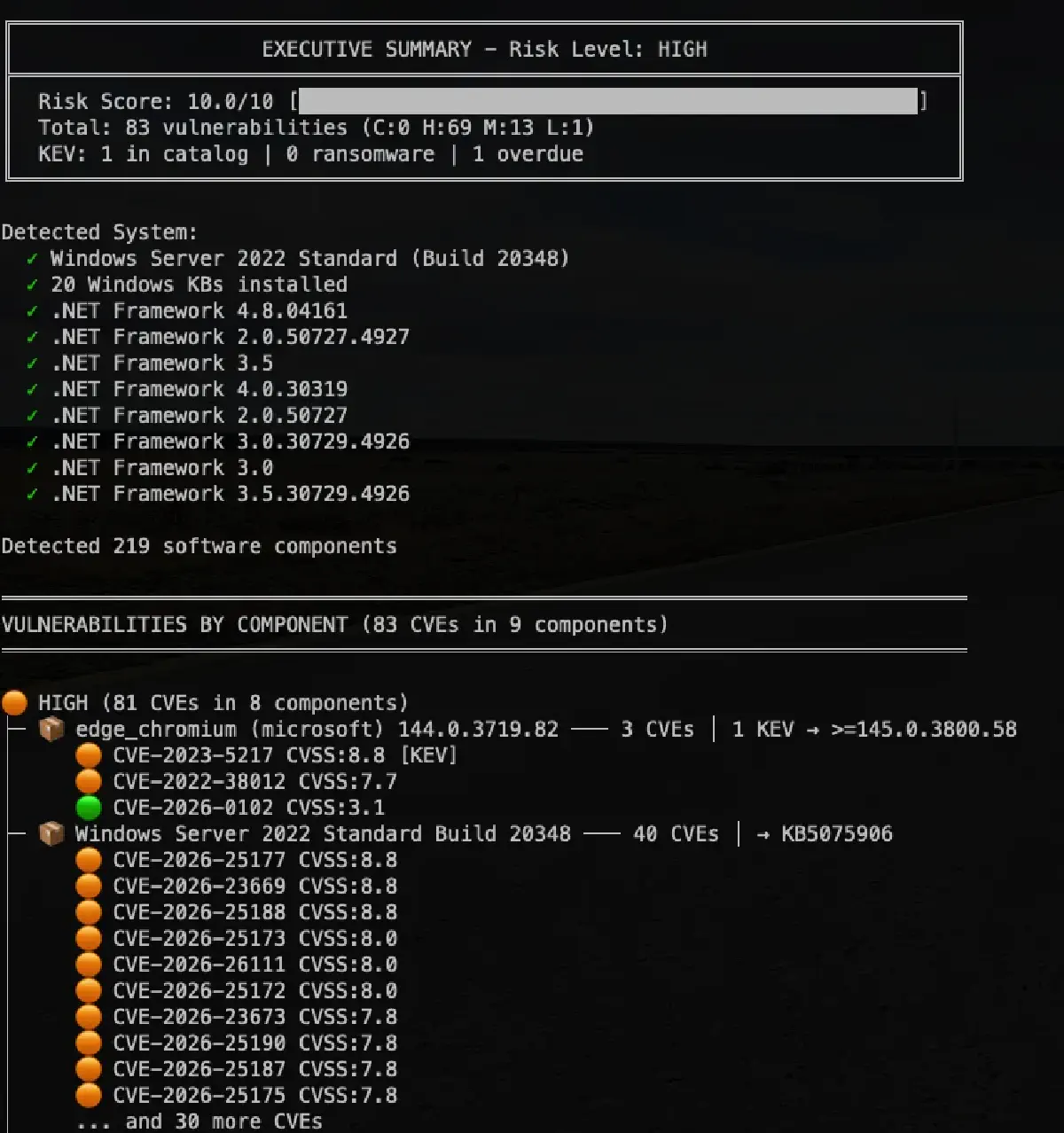
The terminal output looks something like this:

Architecture#
Jadi’s architecture is designed in well-defined layers:
Scanner Layer: 12 specialized scanners that traverse the filesystem looking for configuration files, manifests, lockfiles, registry hives, and binaries. Each scanner generates a list of detected software in PURL or CPE format.
Matcher Layer: 4 matchers that correlate detected software against vulnerability databases. The PURL Matcher queries OSV and GHSA, the CPE Matcher queries NVD, the KB Matcher queries MSRC (with KB supersedence resolution), and the KEV Matcher enriches results with active exploitation data from CISA.
Database: A unified local database of ~500MB containing all vulnerabilities from the 5 sources. It’s updated daily from the CDN with a simple jadi update-db. Integrity verification is automatic, SHA256 checksum, incremental updates, HTTPS connections, and protection against malicious responses.
Output Layer: Generates reports in any of the 7 supported formats, with filters by severity, KEV, ransomware, and configurable suppression rules with expiration dates.
Technical Decisions#
Some design decisions worth mentioning:
Why Rust? Performance and memory safety. When you’re scanning a filesystem with thousands of files, parsing JSON/YAML/TOML lockfiles, and doing parallel matching against hundreds of thousands of CVEs, you need the tool to be fast. Rust gives us that without sacrificing safety. The codebase currently has around 80 .rs files and over 525 tests.
Why local SQLite instead of direct APIs? Originally the scanner queried vulnerability APIs directly, but this had serious issues: network dependency, rate limits, latency, and the inability to use the tool in air-gapped environments. Migrating to a pre-built database distributed via CDN solved all of this at once. Now you can download the DB once, disconnect from the internet, and scan everything you need with --offline.
Why Cloudflare R2 as CDN? Free egress. When you’re distributing a ~500MB file to potentially many users, egress costs on S3 or GCS scale up fast. With R2 the infrastructure cost is practically zero.
Flexible configuration: Jadi supports TOML-based configuration for vulnerability suppression rules, useful when you already know about certain findings and want to exclude them from the report. Suppressions include expiration dates so they don’t get forgotten over time.
Use Cases#
Where does Jadi fit into your workflow?
Forensic Analysis / Incident Response: You have a backup of a compromised server. You mount it in read-only mode and run Jadi to identify what vulnerabilities existed at the time of the backup. Was there Log4Shell? Was there an unpatched Exchange? Immediate answer.
Compliance Auditing: You need to generate an SBOM of a legacy system to meet regulations. You mount the backup, generate the inventory in SPDX or CycloneDX, and you have your compliance evidence.
Pre-Restoration Risk Assessment: Before restoring a backup to production, scan it. If it has critical vulnerabilities with active exploits (KEV), better to know before putting it back in production or connecting it to the internet.
Backup Verification: As part of your backup verification process (which everyone should have), add a vulnerability scan. You’re not just verifying that the backup is valid, but that the backed-up system wasn’t a risk.
Performance Options#
For large backups, Jadi offers several optimization options:
# Increase scan threads
jadi scan /mnt/backup --threads 16

# Parallel matching with connection pool
jadi scan /mnt/backup --pool-size 8 --parallel-match

# Skip noisy Windows folders (WinSxS)
jadi scan /mnt/windows-backup --skip-windows-noise

# Exclude specific folders
jadi scan /mnt/backup \
    --exclude-path "node_modules" \
    --exclude-path ".git" \
    --exclude-path "vendor"

# Limit search depth
jadi scan /mnt/backup --max-depth 10
What’s Next#
The project is at v0.1.0 and there’s a long road ahead. Some of the areas I’m working on:
- Improving code testing with dependency injection and repository traits
- Performance optimization with regex caching and reducing unnecessary cloning
- Expanding test coverage, especially in the sync modules
- Refactoring some modules
- More complete documentation
vScan Integration#
But what excites me the most about what’s coming is the integration with vScan. For those who don’t know it, vScan is a tool that allows you to scan for vulnerabilities directly from Veeam backups. Today vScan already supports Trivy and Grype as scanning engines, which as I mentioned before are excellent for Linux and container environments. In the upcoming vScan 2.0.0, support for Jadi will be added, which will cover the gap that currently exists with Windows, scanning Windows server and workstation backups with the same ease that containers and Linux are scanned today.
The integration is already prepared on Jadi’s side, the JSON output generates a compatible format that vScan auto-detects, allowing results to integrate natively into the data protection workflow with Veeam. This means you’ll be able to scan your Veeam backups for vulnerabilities as part of your verification and restoration process, now including Windows as well.
When I launch vScan 2.0.0 I’ll update this post with all the integration details, including usage examples, the complete solution architecture, and specific use cases for Veeam environments. So stay tuned. Or I’ll create a separate post with all the vScan details.
Conclusion#
Jadi was born from a real need I saw in our industry: the lack of specialized tools to assess the security posture of backups and offline systems. It’s free, written in Rust for maximum performance, supports a considerable number of ecosystems and vulnerability sources, and is designed to integrate into existing workflows.
If you work with backups, forensic analysis, incident response, or simply want to know what vulnerabilities that server you backed up last week has, give Jadi a try.
The repository is available at github.com/mescobarcl/jadi. As always, any feedback, bug reports, or feature requests are welcome through the issues.
And as you know, I’m available 24xSiempre!