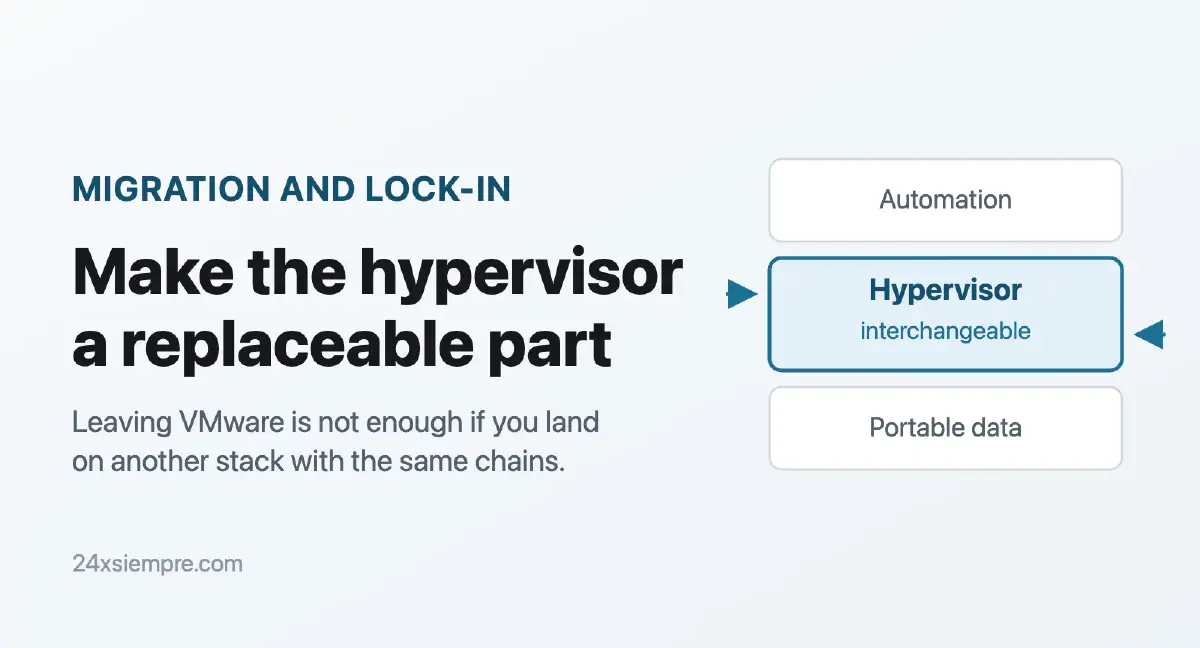
The question is not which one you move to. It is whether you can get out again.#
Leaving VMware does not help much if you land on another hypervisor wearing the same chains. That is the idea behind this post.
For months now I have watched customers across Latin America evaluate Nutanix, OpenShift Virtualization, Proxmox or plain KVM. Almost every conversation starts the same way: “which one do I move to?”. And almost nobody asks the question that matters: “how do I make sure I can get out again?”.
Let us be honest. If you swap VMware for another closed stack, you did not escape the lock-in. You just changed owners. And the new owner can also raise prices, change licensing or shut down a tool overnight.
That last one is not hypothetical. It happened a month ago, with the VDDK. Let us take it step by step.
Changing owners is not changing models#
Most exit plans I see are a straight jump: pull the VMs out of ESXi and drop them into another stack that also ships its own console, its own storage and its own license in the same bundle.
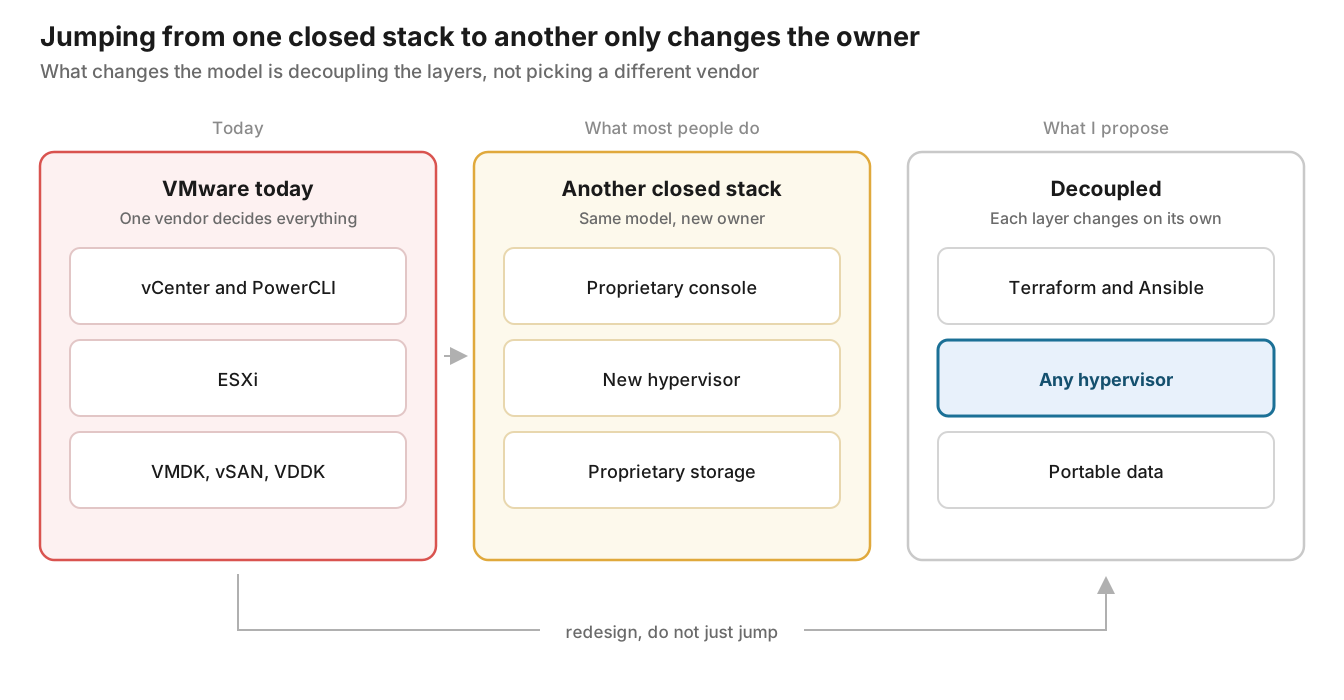
The straight jump solves this year’s problem. The decoupled design solves the next ten years. And it is not much more expensive if you do it while you migrate, because you are going to touch every VM anyway.
Not all lock-in weighs the same#
When we talk about “being locked in” we lump together very different things. Separating them is the first step toward designing well.
| Type of lock-in | What ties you down | Typical example | How you decouple it |
|---|---|---|---|
| Disk and VM format | Disks and metadata only one hypervisor understands | VMDK + VMX, proprietary snapshots | qcow2 or raw, virtio drivers, nothing that depends on an exclusive feature |
| Data access | Needing someone else’s SDK to read your own disks | VDDK on VMware | Copy paths that do not depend on that SDK (more on this below) |
| Management and APIs | Scripts, consoles and automation written against a closed API | PowerCLI, vRO, Prism | Terraform and Ansible with a provider per platform |
| Coupled network and storage | Network or storage that only exists inside the hypervisor | NSX, vSAN, proprietary hyperconverged storage | External standard storage (iSCSI, NFS, Ceph), physical network or open SDN |
| Commercial | Per-core licensing, bundles, forced renewals | Mandatory VCF, 16-core minimums | Short contracts, portable licenses, a tested plan B |
The first three are the most treacherous, because they do not show up on the invoice. They show up the day you try to leave.
And the second one, data access, is the one almost nobody had on their radar until August.
VDDK: the lock-in nobody saw#
The VDDK (Virtual Disk Development Kit) is the library that lets you read VMware disks from outside the hypervisor. It has been around since 2008 and almost every backup and migration tool on the market leans on it.
The catch is its license: it cannot be redistributed. Not Red Hat, not Microsoft, not any open source project can bundle it. They all told you the same thing: “go to the VMware page, download it and drop it in this folder”. A single point of access, controlled by a single owner.
On 25 August 2026 that point of access closed. Broadcom took down the public VDDK download pages with no prior announcement. It later confirmed to TechTarget that the approved use of the VDDK had always been backup and recovery, through its TAP program partners. Migration is not on that list.
Why does this hurt so much? Look at what depended on that download:
- MTV for OpenShift Virtualization: Red Hat strongly recommends using it with the VDDK, and VMs on vSAN simply do not migrate without it.
- Azure Migrate: agentless migration pointed at the Broadcom portal. Its documentation now suggests falling back to agent-based migration.
- Nutanix Move: it also lost its download source, and it is the tool of the platform that comes up most often in evaluations across the region.
- Open source tools such as virt-v2v or migratekit: every one of them asked you to download the VDDK by hand.
The result: migrations that were halfway through got stuck overnight.
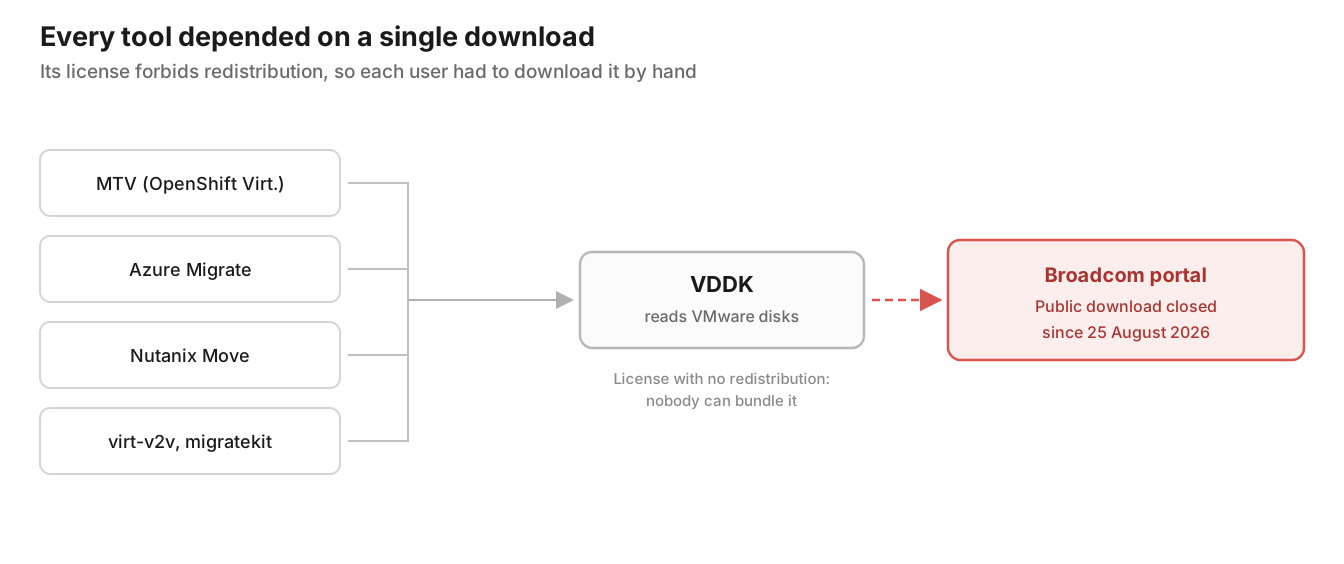
Drawn out like that, the problem is easier to see. It does not matter how open the migration tool is: if someone else controls its critical piece, someone else closes the door.
Now the uncomfortable part. Broadcom did this, but the pattern is not exclusive to Broadcom. Any platform where the only way to get your data out runs through an SDK or an API the vendor controls can do the same to you tomorrow. That is the criterion to carry into the evaluation of your next hypervisor.
What does it cost you to leave?#
Before talking about architecture, put a number on your lock-in. A simple formula:
Exit cost ≈ (VMs × hours per VM × hourly cost) + (cutover windows × downtime cost) + (hours to rebuild automation) + (months running duplicate licenses × monthly cost)
An illustrative example: 300 VMs × 3 hours × USD 40 an hour is USD 36,000 in labor alone. And that is without counting windows, scripts you have to rewrite, or the months paying for two platforms at once.
The interesting part is where a decoupled architecture acts: it lowers the hours per VM. If format, drivers and automation are already solved, each VM is almost a formality. That is the number to take to your boss.
This is no longer only technical, it is regulatory#
Here is something many people in the region are not connecting. Financial regulators across Latin America have spent years asking for exactly what I am proposing in this post: that you can leave a technology provider without the operation collapsing. Most of these rules were written with cloud in mind, but the principle applies just as well to your hypervisor: it is a critical technology provider, and Broadcom just demonstrated it can change the rules overnight.
| Country | Regulation | What it requires, in short |
|---|---|---|
| Brazil | Resolution CMN 4.893/2021 | Relevant processing and cloud contracts must require, on termination, transferring the data to the new provider or to the institution |
| Colombia | Circular Externa 005 of 2019 (SFC) | A migration strategy to another platform if the contract ends or the service degrades |
| Chile | RAN 20-7 (CMF) | Outsourcing with continuity plans; for cloud, an exit plan with portability and interoperability |
| Chile | Law 21.663, Cybersecurity Framework | Operators of Vital Importance must hold continuity plans that are certified and periodically reviewed |
| Mexico | CNBV provisions | Technology service contracts with a termination plan, transition mechanisms and portability |
| European Union | DORA, article 28 | Exit strategies that are documented and tested for services supporting critical functions |
Three things worth looking at closely:
DORA is the benchmark that is coming. It has applied in Europe since January 2025, and its key requirement is not having an exit plan on paper: it is having one that has been tested. Several banks in the region are subsidiaries of European groups, so this already reaches them through the parent company. And local regulators tend to look that way.
Chile is moving. In April 2026 the CMF opened a consultation on an update to chapter 20-7 with a provider lifecycle approach, recognition of “fourth parties” and a new periodic report on outsourced services. The trend is clear: more traceability over who you depend on and how you get out.
The VDDK is the textbook case. If your VMware exit plan depended on a download that no longer exists, your exit plan was not a plan. If an auditor asks you tomorrow “how do you migrate if the vendor cuts off a tool?”, the answer cannot be “we hope it does not happen”.
What I would show an auditor or a risk committee:
- The dependency inventory of the current hypervisor, including the VDDK and proprietary APIs.
- The chosen exit route and why it does not depend on pieces the vendor controls.
- Evidence of a real restore on another platform, with dates and measured times.
- How often that test is repeated.
The architecture: the hypervisor as a replaceable part#
The idea is simple to say and hard to do: make the hypervisor the easiest layer in your stack to change, not the hardest.
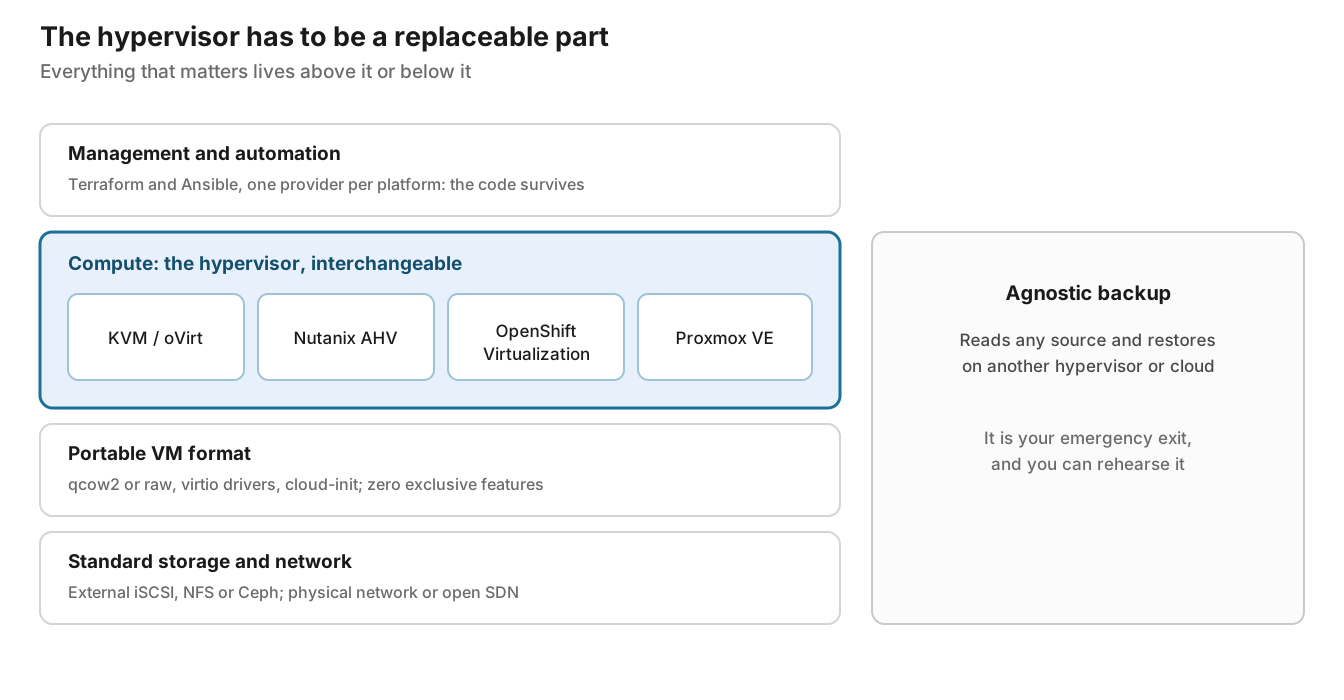
What gives you flexibility is not the hypervisor you pick. It is the layers above, below and beside it. In practical terms:
- Management: Terraform to provision (there are providers for Nutanix, Proxmox, libvirt and KubeVirt) and Ansible to configure. If you change platform tomorrow, you change the provider, you do not rewrite the logic.
- Compute: choose on operations and cost, knowing it is replaceable. If a feature only exists on that platform and your business depends on it, that is lock-in, however comfortable it feels.
- VM format: qcow2 or raw, virtio as the driver standard and cloud-init for initial configuration. A VM built that way boots on KVM, AHV, OpenShift Virtualization or Proxmox without drama.
- Storage and network: external storage with standard protocols lets you connect the new cluster to the same storage. If your data lives inside proprietary HCI, migrating means copying everything again.
- Agnostic backup: the layer we underestimate most. If your backup reads from one source and restores to several targets, every restore is a migration rehearsal.
Where each platform ties you down#
None of them is “the bad one”. They all tie you down somewhere; what matters is knowing where, and whether that knot bothers you.
| Platform | Disk format | Where it ties you down | How you get out |
|---|---|---|---|
| KVM / oVirt / OLVM | qcow2 or raw | Operations and support: your team has to know KVM, and oVirt today leans on the community | Open formats, oVirt API and standard imageio |
| Nutanix AHV | vDisks inside Nutanix distributed storage | The whole stack: HCI, Prism and licensing come as one package | Export disks or restore from an agnostic backup |
| OpenShift Virtualization | Disks on PVCs, through KubeVirt | The entire OpenShift platform and its subscription | KubeVirt is upstream and disks can be exported from the PVCs |
| Proxmox VE | qcow2, raw, ZFS or Ceph | Little technical lock-in; the risk is support and scale | Open formats, qemu-img and you are done |
Look at the third column. In almost every case the knot is not the hypervisor itself: it is what comes attached to it.
Exit routes that do not depend on the VDDK#
Good news: the VDDK is not the only way to get your VMs out of VMware. It is the most convenient one, but there are at least four others.
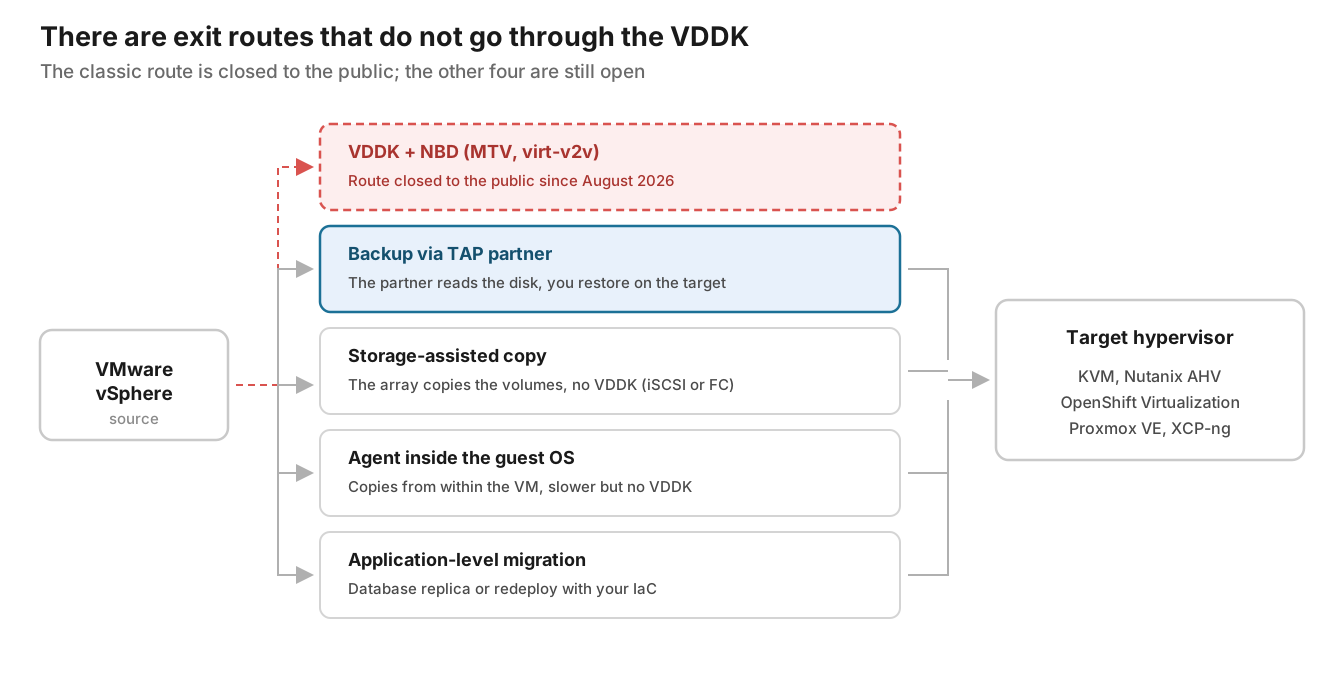
- Backup via a TAP partner: here is the irony. Broadcom says the approved use of the VDDK is backup and recovery through partners. Fine, use that. A Veeam backup reads your VMs on vSphere legally and, in version 13.x, restores to Nutanix AHV, Proxmox VE, oVirt KVM, HPE Morpheus VM Essentials, XCP-ng, Citrix XenServer, Scale Computing HyperCore, Hyper-V and public clouds, injecting virtio drivers during the restore for several of those targets. For OpenShift Virtualization there is a dedicated plug-in. Your migration becomes a restore.
- Storage-assisted copy: if your datastores live on an iSCSI or FC array, the array can do the copy. Platform9’s vJailbreak already offers that mode without the VDDK, and MTV supports copy-offload mappings. Note that NFS is still a limitation in some cases.
- Agent inside the guest OS: slower and more manual, but it never touches the VDDK. It is exactly the plan B Azure Migrate now suggests.
- Application-level migration: for databases and critical services, sometimes the best move is not to move the disk at all. Native database replication, or a redeploy with your IaC on the target.
One honest warning about the first route. If your backup is your exit door, the backup has to be portable too. Check that it restores to several targets, that you can export to standard formats and that the license moves with you. Otherwise you just raised the lock-in by one layer.
The toolbox, layer by layer#
You do not need all of this on day one. But if you are building your architecture, this is the list I would start from.
| Layer | Tool | What you use it for | Does it depend on the VDDK? |
|---|---|---|---|
| Management | Terraform / OpenTofu | Provision VMs and networks with a provider per platform | No |
| Management | Ansible | Configure OS and applications the same way on any target | No |
| Format | qemu-img | Convert disks between VMDK, VHDX, qcow2 and raw | No |
| Format | cloud-init and virtio drivers | First boot and standard drivers on any KVM | No |
| Migration | MTV (OpenShift Virtualization) | Migrate from vSphere to OpenShift in waves | Yes: recommended, and mandatory with vSAN |
| Migration | virt-v2v | Convert VMs to KVM and inject virtio | Only in one of its input modes |
| Migration | vJailbreak (Platform9) | Migrate from vSphere to Private Cloud Director | It has modes without the VDDK |
| Protection | Veeam Backup & Replication | Back up on one hypervisor and restore on another | It uses it as a TAP partner; you never download it |
That last column is the one I would add to any tool evaluation from here on.
The mistakes that always bite#
- Windows without virtio drivers. The classic: the VM lands on KVM and will not boot because it cannot see the disk. The fix is installing the virtio drivers before migrating.
- Linux without virtio in the initramfs. Same problem, different system. Rebuild the initramfs with the virtio modules before the cutover.
- The network changes its name. On Linux,
ens192becomes something else. On Windows, the IP stays attached to a ghost NIC. Document the IPs before and validate after. - BIOS vs. UEFI. If the VM boots in UEFI on VMware and you create it in BIOS on the target, it will not start. Match the firmware mode.
- Hardware-based licensing. Windows may ask for reactivation because of the virtual hardware change. And with Oracle Database, be careful: Oracle only recognizes hard partitioning on some technologies, such as its own KVM. On other hypervisors you could end up licensing every core on the host. Check it against your contract before moving a database.
- VMware Tools left behind. Uninstall them after migrating; in some cases they cause performance problems or services that will not start.
Turning it into a plan#
All of this sounds good on paper. So it does not stay there, I would organize it into five phases.
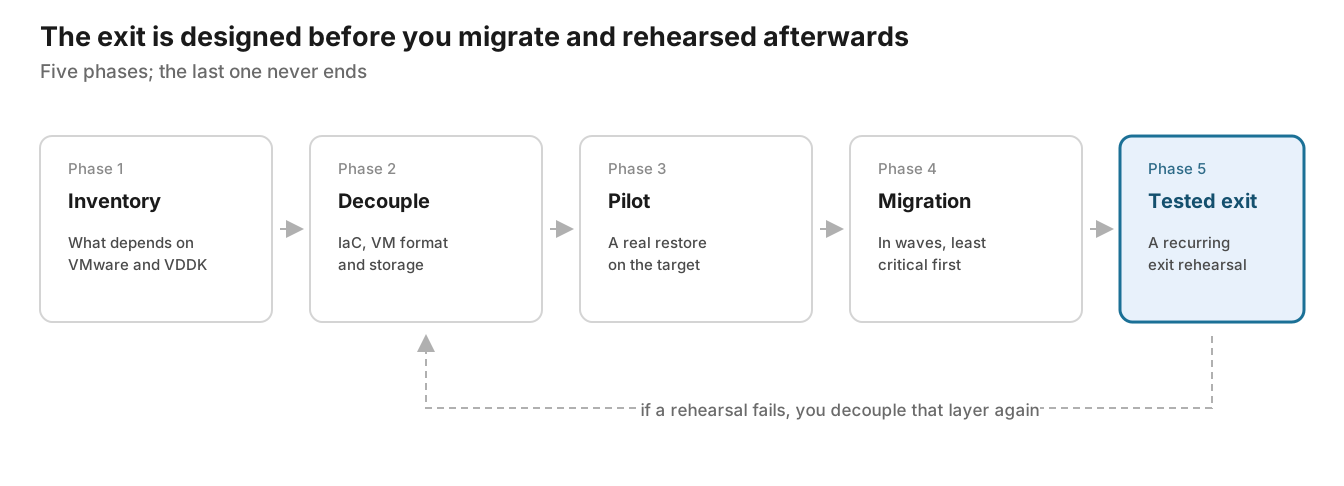
- Inventory: list what depends on VMware beyond the VMs. PowerCLI scripts, vCenter integrations, tools that use the VDDK, appliances that only exist as OVA.
- Decouple: move the automation to Terraform and Ansible, set qcow2 and virtio as the standard, and pull the storage out of the hypervisor wherever you can.
- Pilot: pick a couple of real VMs and do a full restore on the target. Measure times, check drivers and networking. This is the moment to find surprises, not in production.
- Migration in waves: start with the least critical and work up. Each wave leaves lessons for the next.
- Tested exit: this phase never ends. Every so often, rehearse a restore on a hypervisor other than the one you use. If it fails, you go back to phase 2 for that layer.
Phase 5 is what turns the whole exercise into architecture, rather than just one more migration project.
To close#
I am not going to tell you which hypervisor to move to. Nutanix, OpenShift Virtualization, Proxmox and KVM all have good reasons to exist, and the best option depends on your team and your operation.
What I will tell you is this: the important decision is not the destination. It is that the destination is not the last one. Design so the hypervisor is one more part, replaceable, and so your data, your automation and your backup live above it.
What happened in August with the VDDK was the reminder. The next one can come from anywhere.
How are you approaching this? Have you already tried restoring on a different hypervisor, or is it still on the list of pending items?
Frequently asked questions#
What is the VDDK and why does it matter when leaving VMware?
The VDDK (Virtual Disk Development Kit) is the library that lets you read VMware disks from outside the hypervisor. It has been around since 2008 and almost every backup and migration tool leans on it. It matters because its license forbids redistribution: every tool asked you to download it yourself from the VMware portal, which created a single point of access controlled by one vendor.
What happened to the VDDK in August 2026?
On 25 August 2026 Broadcom took down the public VDDK download pages, with no prior announcement and no transition period. It later confirmed to TechTarget that the approved use of the SDK had always been backup and recovery through its TAP program partners. Access is now restricted to that list of approved partners.
Which migration tools were affected?
The ones that relied on the user downloading the VDDK: the Migration Toolkit for Virtualization for OpenShift Virtualization, Azure Migrate in its agentless mode, Nutanix Move, and open source projects such as virt-v2v and migratekit. Several migrations that were halfway through got stuck overnight.
Can you migrate from VMware without using the VDDK?
Yes, there are at least four routes still open. Restoring from a TAP partner’s backup (for example Veeam, which reads vSphere legally and restores to Proxmox, oVirt, Nutanix AHV, HPE VM Essentials and others), storage-assisted copy when the datastores live on an iSCSI or FC array, an agent inside the guest operating system, or application-level migration with native database replication.
What do Latin American regulators require about leaving a provider?
Brazil (CMN 4.893/2021), Colombia (Circular Externa 005 of 2019), Chile (RAN 20-7 from the CMF and Law 21.663) and Mexico (CNBV provisions) all ask for the same thing in different words: a migration strategy, data portability and termination plans. DORA, in Europe, goes one step further and requires the exit strategy to be documented and tested, not just written.
How do I make my hypervisor a replaceable part?
By decoupling the layers around it: automation in Terraform and Ansible instead of scripts against a proprietary API, a portable VM format with qcow2 and virtio drivers, storage and networking on standard protocols outside the hypervisor, and a backup that reads from one source and restores to several targets. With that, changing hypervisor stops being a project and becomes a decision.