Data protection, Kubernetes, cybersecurity and AI. Hands-on guides from the trenches: Veeam, Kasten, VMware, Oracle, cloud, and whatever I’m breaking in the homelab this week.
Table of ContentsTable of Contents
In this guide we will walk through installing and configuring Prometheus to send alerts by email, using Prometheus federation, rules, and Alertmanager together with the monitoring built into Kasten K10.
We will set up the configuration first for the integration with K10 Multi-Cluster Manager, and then look at how to configure the rules for an installation without centralized administration.
Prometheus is a solution focused on monitoring Kubernetes resources based on time-series metrics, that is, real-time monitoring of whatever you configure it to watch. For example, with Prometheus you can monitor, through rules, CPU usage, memory, connections, sessions, or anything else you want to track.
It is also the standard solution for monitoring Kubernetes clusters, since it gives you a very detailed view of the resources you care about and helps you troubleshoot any errors that come up.
Kasten also uses Prometheus for its internal monitoring of K10. In fact, from the link above you can see that Kasten K10 exports many metrics to Prometheus, for example:
catalog
jobs
actions
backup
restore
export
import
report
run
So how do we configure Prometheus to send us an email when, for example, a backup policy fails?
As we know, Prometheus already comes pre-installed with Kasten K10, but you should not modify that instance: it is managed by Helm and has specific settings that work directly with the default Kasten K10 reports, and also with K10 Multi-Cluster Manager if you have it enabled. The approach, then, is to federate the pre-installed Prometheus (leaving it untouched) with a new Prometheus instance:
We will start by creating a namespace for our monitoring instance, which in this case we will call alertas. To do so, run the following in your Kubernetes cluster:
kubectl create ns alertas
```bash
Next, add the Prometheus Helm repository:
```bash
helm repo add prometheus-community https://prometheus-community.github.io/helm-charts
```bash
Now create a new file named "kasten\_prometheus\_values\_smtp.yaml":
```bash
defaultRules:
create: falsealertmanager:
config:
global:
resolve_timeout: 5m
route:
repeat_interval: 30m
receiver: 'email' routes:
- receiver: 'email' match:
severity: kasten
receivers:
- name: 'email' email_configs:
- to: [email protected] from: [email protected] smarthost: smtp.24xsiempre.com:25
auth_username: SuperDuperUserName
auth_password: SuperDuperPassword
prometheus:
prometheusSpec:
additionalScrapeConfigs:
- job_name: k10
scrape_interval: 15s
honor_labels: true scheme: http
metrics_path: '/k10/prometheus/federate' params:
'match[]':
- '{__name__=~"jobs.*"}' - '{__name__=~"catalog.*"}' static_configs:
- targets:
- 'prometheus-server.kasten-io.svc.cluster.local' labels:
app: "k10"#Valores para deshabilitar componentes que no son necesariosgrafana:
enabled: falsekubeApiServer:
enabled: falsekubelet:
enabled: falsekubeStateMetrics:
enabled: falsekubeControllerManager:
enabled: falsekubeEtcd:
enabled: falsekubeProxy:
enabled: falsecoreDns:
enabled: falsekubeScheduler:
enabled: false```bash
You need to edit the following lines:
- **to**: [email protected]- **from**: [email protected]- **smarthost**: smtp.24xsiempre.com:25
- **auth\_username**: SuperDuperUserName
- **auth\_password**: SuperDuperPassword
Update the variables above with your own values and save "kasten\_prometheus\_values\_smtp.yaml":
Now install Prometheus with the following command:
```bash
helm install prometheus prometheus-community/kube-prometheus-stack -n alertas -f kasten_prometheus_values_smtp.yaml
```bash
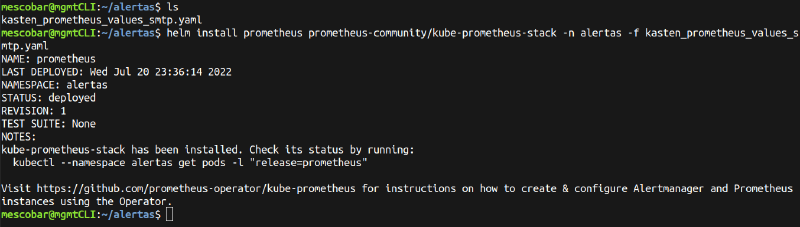
To confirm that it installed correctly, run:
```bash
kubectl --namespace alertas get pods -l "release=prometheus"```bash
## Creating Prometheus Rules for K10 Multi-Cluster ManagerThis is the most important part of the configuration. Because we are using K10 Multi-Cluster Manager, we need to identify each of the clusters protected by Kasten K10 correctly. The documentation includes a key "Tip": to target a secondary cluster, add the `{cluster="desarrollo"}` selector, where the cluster name matches how you named it in Multi-Cluster Manager. For the primary cluster, use `{cluster=""}`.
For this guide, I have 3 clusters configured:
- produccion (primary cluster for K10 Multi-Cluster)- desarrollo (secondary cluster for K10 Multi-Cluster)- tanzu (secondary cluster for K10 Multi-Cluster)So we will create the configuration file named "alertas\_cluster.yaml" and copy in the following content:
```bash
apiVersion: monitoring.coreos.com/v1
kind: PrometheusRule
metadata:
labels:
app: kube-prometheus-stack
release: prometheus
name: prometheus-kube-prometheus-kasten.rules
spec:
groups:
- name: kasten_alert
rules:
- alert: K10JobsFailsClusterProd
expr: |-
increase(catalog_actions_count{cluster="", status="failed"}[10m]) > 0for: 1m
labels:
severity: kasten
annotations:
summary: "Politicas de Kasten K10 con error hace 10 minutos" description: "Politica << {{ $labels.policy }} >> en cluster << produccion >> Ha fallado en los ultimos 10 minutos" - alert: K10JobsFailsClusterDev
expr: |-
increase(catalog_actions_count{cluster="desarrollo", status="failed"}[10m]) > 0for: 1m
labels:
severity: kasten
annotations:
summary: "Politicas de Kasten K10 con error hace 10 minutos" description: "Politica << {{ $labels.policy }} >> en cluster << {{ $labels.cluster }} >> Ha fallado en los ultimos 10 minutos" - alert: K10JobsFailsClusterTanzu
expr: |-
increase(catalog_actions_count{cluster="tanzu", status="failed"}[10m]) > 0for: 1m
labels:
severity: kasten
annotations:
summary: "Politicas de Kasten K10 con error hace 10 minutos" description: "Politica << {{ $labels.policy }} >> en cluster << {{ $labels.cluster }} >> Ha fallado en los ultimos 10 minutos"```bash
For each alert, the variables to edit are:
- alert: the name of the alert
- expr: ONLY edit the cluster name (remember the tip above)- summary: summary text, without touching the variables
- description: descriptive text
The most important variable in the file above is "expr", which is the query sent to Prometheus against the Kasten K10 metrics to detect job failures. If you want to build new queries, take a look at:
[https://prometheus.io/docs/prometheus/latest/querying/basics/](https://prometheus.io/docs/prometheus/latest/querying/basics/)Finally, we create the rules in our Prometheus instance:
```bash
kubectl apply -f alertas_cluster.yaml -n alertas
```bash
And to confirm the rule was created:
```bash
kubectl get prometheusrules.monitoring.coreos.com -n alertas
```bash
## Creating Prometheus Rules without K10 Multi-ClusterIf you have installed Kasten K10 without K10 Multi-Cluster, you can still configure rules without having to declare the cluster name. The only difference is the rule itself, which should look like this:
```bash
apiVersion: monitoring.coreos.com/v1
kind: PrometheusRule
metadata:
labels:
app: kube-prometheus-stack
release: prometheus
name: prometheus-kube-prometheus-kasten.rules
spec:
groups:
- name: kasten_alert
rules:
- alert: K10JobsFail
expr: |-
increase(catalog_actions_count{status="failed"}[10m]) > 0for: 1m
labels:
severity: kasten
annotations:
summary: "Politicas de Kasten K10 con error hace 10 minutos" description: "Politica << {{ $labels.policy }} Ha fallado en los ultimos 10 minutos"```bash
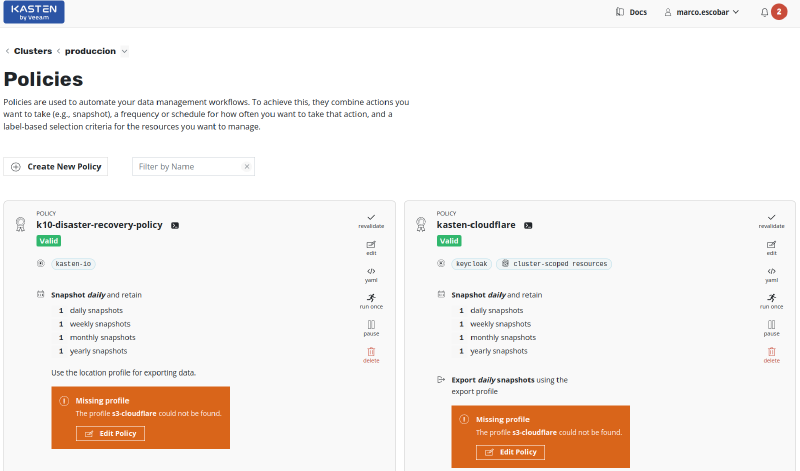
## Testing Email AlertsTo test this configuration, we need to make the cluster backup policies fail. To do that, we will remove the Kasten K10 backup repositories, or "Location Profiles", from the existing backup policies to force an error. The policies will then look like this:
Finally, we run the policies that now produce the error. At this point we should expect the alerts to arrive by email. If we run the following command:
```bash
kubectl port-forward service/prometheus-kube-prometheus-prometheus 9090:9090 -n alertas
We can open the Prometheus web console to see the rules we created:
When the backup policies run with errors, Prometheus detects them through the rules:
It then fires the alert, and the email is sent:
Here are some examples of the notifications, or alerts, that land in your inbox, including the name of the backup policy and the cluster where the error occurred:
In some cases where Prometheus instances already exist, adding a new instance to monitor and federate the Kasten K10 Prometheus may not work correctly. For example, in Rancher with “cattle-monitoring” you need to disable the Prometheus operator; otherwise both instances will try to override each other and force the pods to restart.
As for Kasten K10 notifications and alerts, you can create new queries to obtain other types of data, such as licenses, used space, and so on.