Data protection, Kubernetes, cybersecurity and AI. Hands-on guides from the trenches: Veeam, Kasten, VMware, Oracle, cloud, and whatever I’m breaking in the homelab this week.
Table of ContentsTable of Contents
A few people have recently asked me whether Veeam supports or works with Oracle Cloud Object Storage so they can use it as a Veeam Capacity Tier, and since the previous post covered Oracle, this one walks through integrating Oracle Cloud Object Storage with a Veeam Scale-Out Backup Repository (SOBR) and the advantages of a solution with multi-cloud mobility.
To learn more about Veeam Capacity Tier, its configurations, requirements, and so on (this guide will not go into the details of Capacity Tier), the best starting point is the official documentation, where you can check the supported services:
As you can see in the link above, there is no “direct support” for working with Oracle Cloud Object Storage, but there is an option listed as “S3-compatible object storage repository”, and we need to confirm whether it can be added through that path.
That is why the Veeam forums ( Veeam Forums, sign up) host an “Unofficial” list where you can find every Object Storage provider with known compatibility and immutability support, and which is of course kept up to date:
In that link you will find Oracle Cloud Object Storage (Cloud Object Storage) listed as “Compatible” NEW, which tells us the two solutions work together, so let’s configure it. It is very important to validate with Veeam support if you need a guarantee of operation.
With our Oracle Cloud account ready (for testing you can use the Oracle Cloud Free Tier, which provides 10 GB of Object Storage space), we first need to create the access credentials for the Oracle Cloud services. To do this, inside the Oracle Cloud console go to Identity > Users:
Oracle Cloud Users
Next, create a user by clicking “Create User”, select IAM mode, and enter the username, a description, and an email if you have one. You will then see the created user and its details:
Add the user to the Administrators Group:
Then create the “Customer Secret Keys” you will use to authenticate against Object Storage in Oracle Cloud. Click “Generate Secret Key”, enter a name for the key, and copy the generated key:
The new key now appears in the Customer Secret Keys table:
Now, inside the Oracle Cloud console, go to Object Storage administration, where you will see:
This is where we create the Bucket that will store the backups sent through Veeam Capacity Tier. Click “Create Bucket”, enter a unique name, and select the following:
Once the bucket is created with the settings above, it is listed under the name you entered:
The Object Storage bucket in Oracle Cloud is now created, and we can move on to configuring Veeam Backup & Replication.
Since we already know that Oracle Cloud Object Storage is compatible with Veeam Backup & Replication, having confirmed it on the Veeam forums, all that is left is the configuration, which is very simple. We will add an Object Storage repository of the S3-compatible type:
Enter a name for the repository, click Next, and here comes the interesting part: you need to enter the Service Point, the Region, and the credentials you generated earlier under “Customer Secret Keys”.
Let me explain something important about the values above, because first you need to know the Service Point URL, which follows this format:
<object-storage-namespace>.compat.objectstorage.<region>.oraclecloud.com
```text

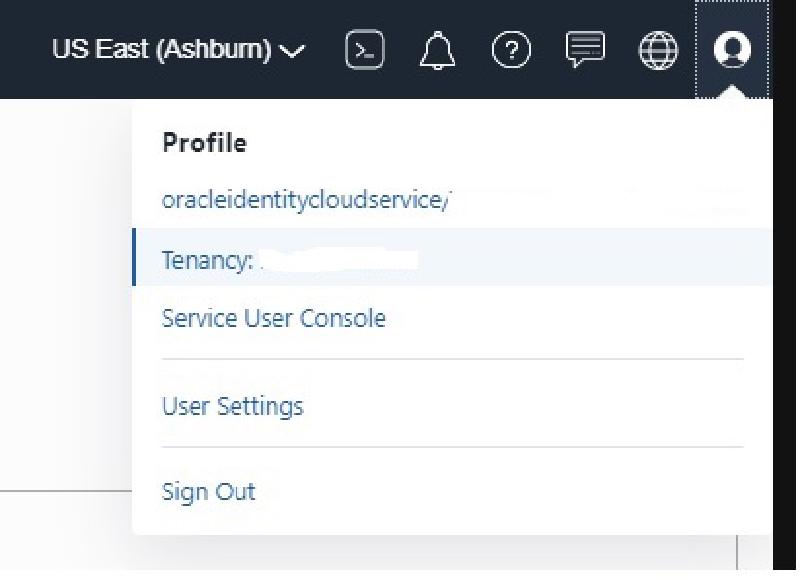
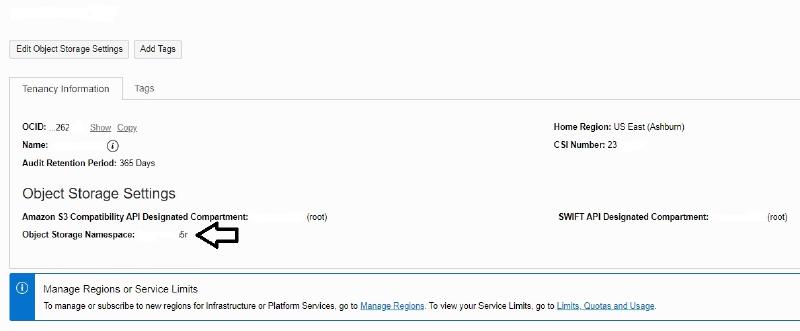
The first thing to look up is the `<object-storage-namespace>`, since the region is always visible in your Oracle Cloud console. To find the namespace, open your tenant menu and click "Tenancy: My Tenant Name", which in your case will be whatever name was assigned to the tenant:


Then you will see:


Copy it and you have the Service Point for the Veeam Backup & Replication configuration, which ends up looking like this (in my case the region I used was us-ashburn-1):

```text
asdasdW$AWAXasda.compat.objectstorage.us-ashburn-1.oraclecloud.com
Now that we have the Service Point, enter it in the Veeam configuration along with the Region and the credentials generated earlier to access the service. If you want, you can use a Gateway Server defined in Veeam Backup & Replication to handle the connection to the service over the Internet, then click Next, where you can see the Bucket:
Next, create a folder inside the Bucket by clicking “Browse” (I called mine Backup, very original :) ):
Only if you need it, you can set a usage limit on the Bucket in terms of TB; otherwise, leave it unset, as with immutability (remember this integration is only supported as Object Storage without immutability). Click “Next” and you will see the configuration summary:
Then edit your beautiful Scale-Out Backup Repository (SOBR) in Veeam Backup & Replication to enable the Capacity Tier feature and choose how backups are uploaded:
Keep in mind that the first option, “Copy”, copies the backups produced by Veeam Backup & Replication as soon as the Backup Job finishes, so you get a copy of your backups almost at the same time as you have them on-premises. The second option, “Move”, lets you move all your backups after a set number of days to free up space on your local storage or server, while still allowing both granular recoveries and full virtual machine restores directly from Object Storage.
Apply the configuration and run a backup of your virtual machines, so you can then watch the data being sent directly in the Veeam Backup & Replication statistics:
Finally, you can confirm that your backups are being sent to Object Storage in Oracle Cloud by opening the Oracle Cloud console and browsing inside the Bucket:
In the image above, you can see the folders created by Veeam Backup & Replication as well as the backup we sent for storage.
To sum up, as we have seen, it is indeed possible to use Oracle Cloud Object Storage with Veeam Backup & Replication, whether you are evaluating the service or are already an Oracle Cloud customer.
This is a clear demonstration of the multi-cloud mobility that Veeam Backup & Replication provides, letting us keep copies of our backups across multiple platforms or cloud services so we can recover quickly in the event of a disaster or a ransomware attack.