
In this post, I’ll go over the operating systems most widely used by organizations in IT environments, whether in the public cloud or in local data centers, and tackle the classic question: which operating system is more secure? Microsoft Windows, Linux, OpenBSD, FreeBSD? Or, looking at it from another angle, what protection measures should we apply to these operating systems? Is a firewall and antivirus enough? Is it enough to disable the SSH service in Linux environments? Is it enough to simply not use root?
Introduction#
A while back, and during the most recent VeeamON Tours across Latin America, I talked with customers and colleagues about that classic question: which operating system is more secure? Some said Linux is always safer, others said Windows, and a few chose OpenBSD (one of whose goals is to be the most secure OS) or FreeBSD. But does the operating system really matter, or is what really matters how it’s deployed and how these systems are protected? Always, of course, from a security standpoint.
In general, people talk about “hardening” operating systems to achieve security by default, but is that “hardening” kept up to date over time? Those who claim Linux is more secure: how often do they patch their Linux servers once a vulnerability is disclosed? In my experience across Latin America, very few of the organizations I know do keep their Linux or BSD servers up to date. A significant share, however, would rather stay exposed to any attack based on a Linux/BSD vulnerability or a flaw in an application that provides services. And that’s without mentioning the professionals who don’t want to update Windows because they aren’t sure the software they have installed will keep working, or who simply hold the belief that “no one is going to attack my company.”
Is Your Organization Ready to Face an Attack?#
That’s a big question, and it isn’t easy to answer. In general, the answer is always No, because many factors within organizations keep IT teams from minimizing risk. Here are some of the most common problems I’ve seen:
- Budget
- Old or legacy applications
- Lack of training
- No use of a security framework
- Lack of controls in the IT infrastructure
- Credential reuse
- No use of RBAC (Role-Based Access Control)
- Lack of documentation
With the examples above, preparing for an attack becomes very complex. In fact, all it takes is some basic OSINT to identify specific organizations along with the services they’ve published (RDP, ILO, SQL, IDRAC, and so on) on the internet without the necessary security in place.
Which Security Framework Should You Use to Minimize Risk?#
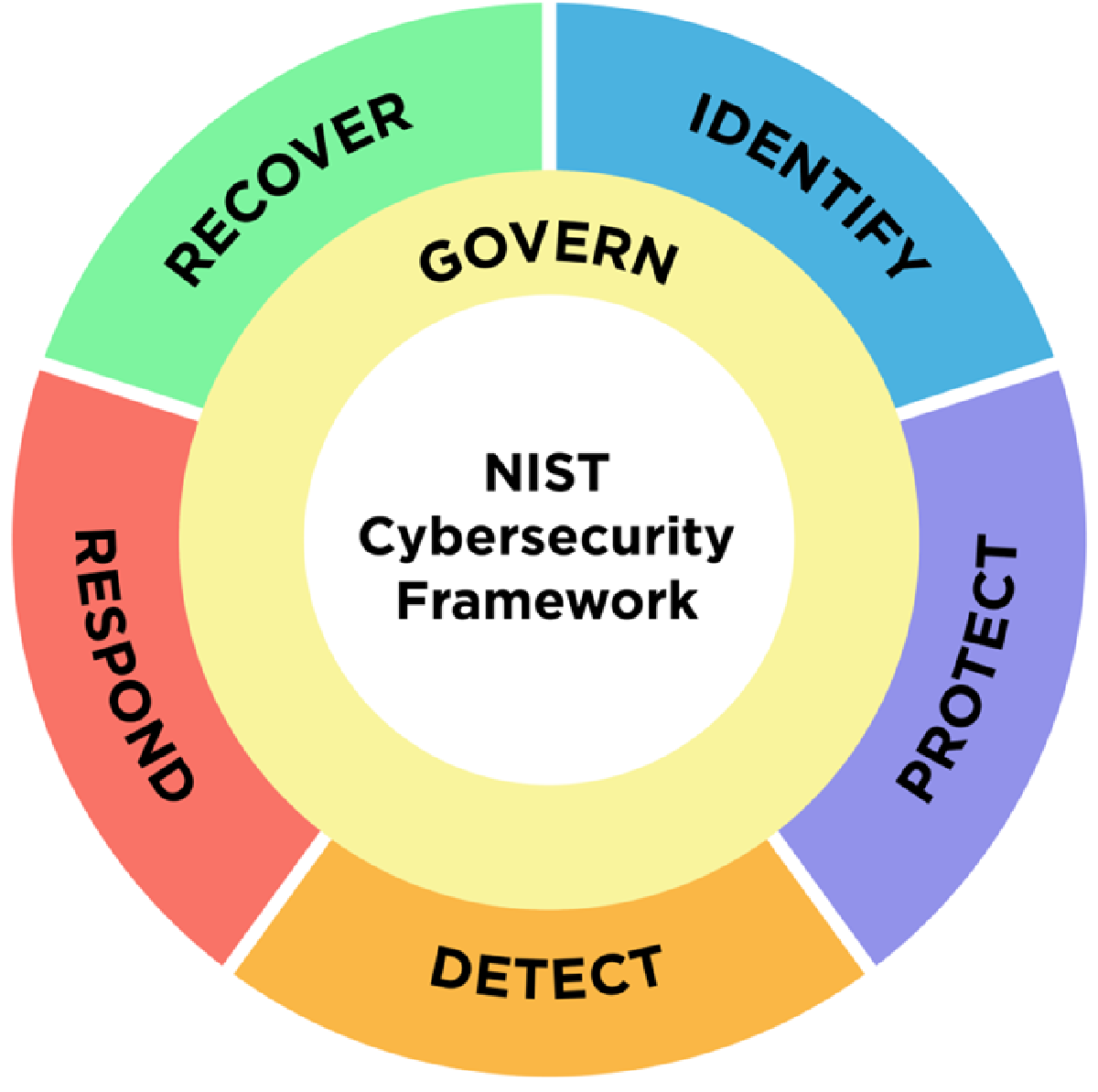
As a side note, since security frameworks deserve a post of their own, the first framework to adopt in your organization could be the Cyber Security Framework (CSF), whether the currently published version 1.1 or the upcoming draft, version 2.0, from the National Institute of Standards and Technology (NIST) in the USA. According to version 2.0, there are 6 core functions:

With these functions, you can implement the strategy you need to minimize cybersecurity risk, so that in the event of an attack you can respond promptly. An excellent companion to the CSF is Special Publication SP 800-53r5, which you can use to apply the necessary controls.
- CSF https://www.nist.gov/cyberframework
- SP 800-53r5 https://csrc.nist.gov/pubs/sp/800/53/r5/upd1/final
Which Operating System Should You Choose for the Services You Provide?#
Coming back to the main topic, which operating system is more secure? The first thing to review is which service or services we’re going to install or run on our server. Then, depending on the organization’s or the vendor’s requirements, we check whether the solution can be deployed in the native cloud, in a hybrid model, on-premises, on Kubernetes, or serverless, with the goal of finding the best way to deliver high availability.
Now, regarding the decision of which operating system to work with, whether it’s dictated by the software that will run on the server or by organizational guidelines, the first thing to review is whether we’re going to expose services to the internet, what kind of services, and how we’ll authenticate internal or external users. That tells us which security solutions will let us provide at least basic protection for delivering those services.
Once we understand the services to be provided, we must ALWAYS define how those services and the operating system will be protected, of course with a sound data backup strategy that lets us recover data in different ways. That way, in the event of an attack, we have multiple recovery options aligned with the business continuity requirements.
Finally, by reviewing the requirements of the software or platform to be installed on the server, we can make a decision that works for the solution and aligns directly with the organization’s or company’s security policies.
So, Which Operating System is More Secure?#
The answer is fairly simple: the most secure operating system will always be the one that’s correctly implemented from the standpoint of comprehensive security and safe usage. That means complying with security controls (800-53r5, for example), applying local security policies, monitoring, and using various network and host security systems. So it’s not just about the operating system; it’s about all the procedures, tools, and security policies that go hand in hand with managing and using the services in question.
Every operating system, applications included, has or will have security vulnerabilities, because there will always be people or organizations dedicated to finding some kind of flaw, whether as a hobby, to create malware, or for the sheer joy of research.
That’s why one thing worth considering is the ability and frequency with which the different operating system and application vendors ship security updates or new features. For example, with some Kubernetes-based solutions, the container images in use and the application itself are continuously improved or updated to minimize the risk of any vulnerability.
This is why it isn’t a question of the type of operating system. Is Linux more secure than Windows? Is Windows more secure than Linux? Is macOS more secure than either? Is OpenBSD the most secure system? As we’ve seen, none is more secure than the others: you only have to search the various vulnerability databases:
In the links above, you’ll find not only operating system vulnerabilities but also those of the applications that can run on servers or workstations.
Monitoring and Protection#
Every time a new server is provisioned, whether virtual or physical, it MUST have an associated mechanism for monitoring services and the behavior of the various resources the server will use, along with a MANDATORY patch update scheme and data protection, with Veeam, of course :). As we saw earlier, when you use a security framework it’s critically important to know what your disaster recovery plans will be and to define your RTO / RPO so you can meet the required timelines.
Why does monitoring matter? Beyond monitoring services, today’s monitoring systems, such as Veeam ONE, give you insight into how your virtual machines behave. In other words, you can spot IOPS or CPU consumption that looks suspicious on a day that isn’t part of the usual monthly load. With that information in hand, you can then apply corrective actions manually or automatically.
For example, with zero-day (0-day) vulnerabilities, it’s crucial to monitor systems and services to know whether these vulnerabilities are being exploited or whether the server has started to behave abnormally.
Updates#
You absolutely must maintain a strict update policy, regardless of the operating system in use, because the first line of attack is exploiting existing operating system vulnerabilities, for example remote command execution (RCE), which has recently been leveraged against certain versions of VMware hypervisors. Beyond keeping operating systems up to date, it’s equally critical to keep updated the dependencies and applications that provide services, such as Atlassian’s solutions, which have had multiple critical vulnerabilities lately.
Technical Security Hardening Guides#
One widely used practice is applying the DISA STIG and OpenSCAP guides, whether for operating systems or for the applications that will run on the servers. It’s very important to review these guides, since you can implement the recommendations in full or pick and choose the ones you need. For example, if you need to apply security controls for Microsoft Windows Server 2022 and Ubuntu 20.04, you only have to visit:
To name just a few, there are more, and depending on your needs you’ll be able to apply the controls that fit your organization’s requirements or business.
Bad Security Practices in Operating Systems or Services#
Some I’ve seen time and again:
- Using Administrator or root to install applications
- Sharing the same credentials across multiple users, e.g. [email protected]
- Not using or enabling MFA
- Not having a strict password change and complexity policy
- Not having a backup and recovery testing policy
- Not centralizing operating system and application logs or events
- Storing passwords in an Excel/TXT file
- Little to no documentation of systems or architectures
- Relying on antivirus alone
- Not using encryption
Good Security Practices in Operating Systems or Services#
Some that should be adopted:
- Always use service accounts for applications
- Segment and apply RBAC to accounts per user
- Disable default or unused accounts
- Enable MFA wherever possible and save the backup codes
- Enforce a password change policy
- Back up all data wherever possible and test recovery periodically
- Monitor and retain logs for all critical systems
- Use enterprise password managers
- Document all the architectures and processes you need
- Deploy security solutions on each of your operating systems
- Encrypt communications and backups
Frequently asked questions#
Which operating system is most secure, Windows, Linux or BSD?
None is inherently more secure than the others. The most secure operating system will always be the one that is correctly implemented from a comprehensive security standpoint: applied controls, local policies, monitoring, and network and host security solutions. Every operating system has or will have vulnerabilities, as you can confirm by searching databases like CVE or the NIST NVD.
Does the operating system matter more than how it is configured and protected?
How a system is deployed, configured and protected matters far more than the operating system brand. It is not just about the operating system, but about all the procedures, tools and security policies that go hand in hand with managing the services. An unpatched Linux box with reused credentials is less secure than a properly hardened and monitored Windows server.
Is Linux more secure than Windows?
Not necessarily. The belief that Linux is inherently safer often breaks down in practice, because many organizations do not keep their Linux or BSD servers up to date once a vulnerability is disclosed. Real security depends on patching frequency, least privilege, monitoring and backups, not on the operating system logo.
Which hardening standards or guides should I apply?
You can rely on well-known frameworks and guides. As a base framework there is the NIST Cyber Security Framework (CSF) together with Special Publication SP 800-53r5 for the controls. For concrete technical hardening of operating systems and applications, the DISA STIG and OpenSCAP guides are widely used, and you can implement them in full or selectively based on your needs.
Is a firewall and antivirus enough to protect a server?
No, relying on antivirus alone is a bad practice. You need a comprehensive strategy: strict patching, MFA, RBAC and least privilege, encryption of communications and backups, centralized logs, behavior monitoring (for example anomalous CPU or IOPS usage), and a backup policy with recovery testing so you have multiple options in the event of an attack.
Why are updates so important?
Because the first line of attack is exploiting existing vulnerabilities, such as the remote command execution (RCE) seen in VMware hypervisors. That is why you must maintain a strict update policy regardless of the operating system, and include the dependencies and applications that provide services too, as seen with the multiple critical vulnerabilities in Atlassian solutions.
Recommendations#
The first mandatory rule is to always keep every operating system and service installed on the server up to date, along with the corresponding monitoring, whether from the standpoint of service availability or of audit logs, so you can spot behavior that’s out of the ordinary for the solution and take corrective action.
Of course, deploy security solutions across your different operating systems (not just Windows) to gain complete visibility and monitoring from a security perspective.
Always follow the principle of least privilege and avoid weak authentication methods. If a service isn’t being used, disable it or simply uninstall it entirely.
And, of course, use the Veeam platform to protect all of your organization’s data, whether in your data center, the public cloud, or on workstations, validating recoverability in an automated way, scanning your backups for malware, and then automatically building and documenting Disaster Recovery Plans (DRP) so you can recover the organization with clean, accessible data and no reinfection.